
Creative Studio
API
Resources
Features
About Us
Download

background picture creator - urban energetic & cosmic tranquil

Unleash your creativity with urban vibes and cinematic lighting or dive into serene, cosmic tranquility for unique background pictures. Start exploring background picture creator ideas and generate your own content with AI.

background picture creator - urban energetic & cosmic tranquil

Recommended

Kling AI work 311941368668789 - background picture creator AI video
qPEKfsvS avatar
qPEKfsvS
The Creator - background picture creator AI image
Dev avatar
Dev
Creative Partner
Creator - background picture creator AI video
00:04
tgDJWtNU avatar
tgDJWtNU
tech - background picture creator AI video
PXDQkCHy avatar
PXDQkCHy
Kling AI work 314883826615392 - background picture creator AI image
JM films avatar
JM films
Couple Side by side face picture - background picture creator AI image
sCrJEkuU avatar
sCrJEkuU
Kling AI work 314663318320253 - background picture creator AI video
NovaFable avatar
NovaFable
Kling AI work 312980915508538 - background picture creator AI video
Mushahid Hussain avatar
Mushahid Hussain
Creator - background picture creator AI video
00:49
bwVxpNGT avatar
bwVxpNGT
Digital creator  - background picture creator AI video
fmCLxzOL avatar
fmCLxzOL
Kling AI work 311034683505071 - background picture creator AI video
Blessed avatar
Blessed
Kling AI work 314997518662302 - background picture creator AI video
Blessed avatar
Blessed
Kling AI work 310040985528063 - background picture creator AI video
oLnLgyIB avatar
oLnLgyIB
Timelapes motion in real picture - background picture creator AI video
YYRqIMJD avatar
YYRqIMJD
Kling AI work 309251959615170 - background picture creator AI video
LQnKhZir avatar
LQnKhZir
Kling AI work 318843800661168 - background picture creator AI video
LlrRZfdD avatar
LlrRZfdD
digital creator  - background picture creator AI video
F1 Live
HtSWHTVu avatar
HtSWHTVu
Kling AI work 317226769502743 - background picture creator AI image
fPJymUIk avatar
fPJymUIk
Teams background animated - background picture creator AI video
IIHLZcof avatar
IIHLZcof

How to Create an AI Avatar Video

Create an Avatar

Create an Avatar

Pick a ready-made character from the Avatar Library, return to a saved avatar, upload an image from your device or Assets, or generate someone new with AI Image. The selected image becomes the visual starting point for the video.

Add the Voice

Add the Voice

Upload a finished recording, or enter the lines you want the character to deliver. With text to speech, select a voice and adjust its speed and emotional tone. Use punctuation to place pauses where they naturally belong, especially in longer passages.

Shape the Performance

Shape the Performance

Describe how the character should feel, react, and move while speaking. You can write the direction yourself or begin with one of the performance options Kling AI suggests for the selected character. Generate the video and review the delivery.

Go from Written Scene to Directed Sequence

See Your Scene as More Than One Shot

See Your Scene as More Than One Shot

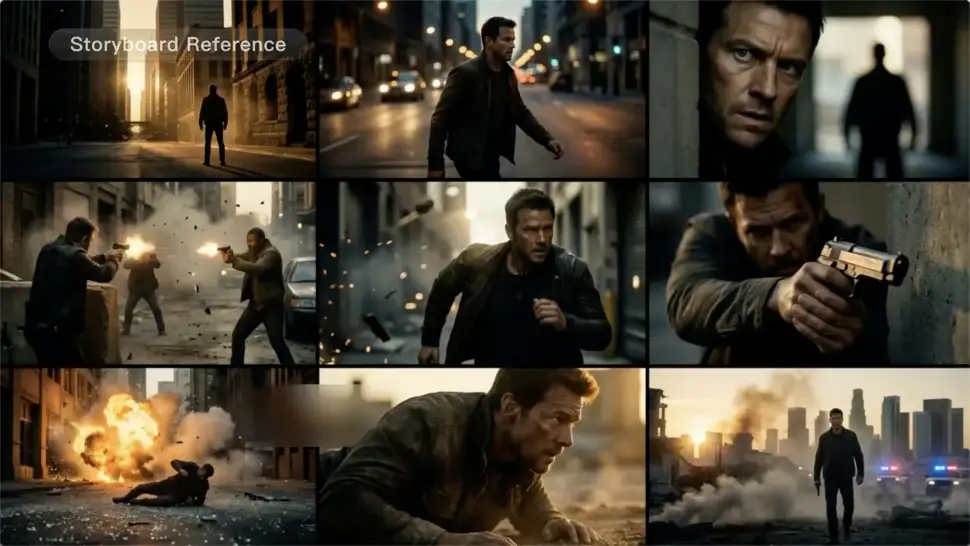
A conversation does not have to stay on one camera angle. An action beat does not have to play out in a single wide shot. Turn on Multi-Shot and Kling can plan scene transitions, framing, and camera-angle changes around what you wrote. A simple story beat can move from an establishing shot to a character close-up, then cut again when the action calls for it.
Take Over the Storyboard When the Shot Matters

Take Over the Storyboard When the Shot Matters

When you already know how the scene should be covered, use Custom Multi-Shot instead of leaving every decision to the model. Decide what happens in each shot, how long it lasts, whether the camera is wide or close, which angle you want, and how the camera moves. It gives you a practical way to turn screenplay direction or a rough shot list into something Kling can generate.

Bring the Same Character into the Next Shot

Bring the Same Character into the Next Shot

A cut should not feel like a new actor walked into the scene. Use a Character Element when someone needs to return across different angles, actions, or settings, and make it clear in the prompt which character belongs in each shot. For workflows that need a richer mix of character, image, video, and scene references, VIDEO 3.0 Omni gives you more ways to anchor the people and visual details your story depends on.

Apps

Image to Video
Image to Video

Image to Video

Text to Video
Text to Video

Text to Video

Omni
Omni

Omni

Digital Human
Digital Human

Digital Human

Restyle
Restyle

Restyle

Text to Image
Text to Image

Text to Image

60M+
60M+
Users
600M+
600M+
AI Videos Generated
4.7 ★
4.7 ★
App Store
Industry-Leading
Industry-Leading
Cinematic 4K

Reviews

Samuele Poggi (@visualsk2)

Samuele Poggi (@visualsk2)

★★★★★

I use Kling AI daily to push the limits of AI filmmaking. It allows me to create highly cinematic content, blending AI and VFX to develop innovative projects. It has significantly impacted my creative process, enabling me to achieve complex animations that would otherwise require high production budgets.

Ozan Sihay

Ozan Sihay

★★★★★

Kling AI allows me to rapidly prototype ideas, refine storytelling elements, and produce visually compelling content efficiently. It has not only accelerated my creative processes, but also deepened my understanding of how AI can enrich visual storytelling.

Jyo John Mulloor

Jyo John Mulloor

★★★★★

Kling AI has been instrumental in transforming my creative workflow, unlocking new dimensions of artistic expression that were once unimaginable. I use Kling AI extensively to develop high-concept visuals, animate surreal dreamscapes, and create AI-assisted films that blur the line between reality and fantasy. Kling AI’s deep learning capabilities have not only enhanced my creative efficiency but also inspired me to explore storytelling in ways I never thought possible.

FAQ

Q1How do I keep the face from changing or morphing in my video?
Q2Can I make the character in my image speak?
Q3Is this image to video AI free to use?

Start Controlling Character Motion

Stop accepting distorted AI movements. Upload your reference and let Kling replicate it precisely.

Works on humans, anime & 3D | High-precision motion | Zero distortion