
Creative Studio
API
Resources
Features
About Us
Download

face expression changer online - emotional transitions & social media trends

Unleash creativity with AI-driven face expression changer tools, transforming everyday emotions into trending, character-rich visuals. Dive into the art of human emotional expression and micro facial dynamics for realistic, engaging content. Start exploring face expression changer online ideas and generate your own content with AI.


face expression changer online - emotional transitions & social media trends

Recommended

Kling AI work 317918437520055 - face expression changer online AI video
djAIKkgc avatar
djAIKkgc
Overwhelmed Mom to Online Earner - face expression changer online AI video
oXDuUrrO avatar
oXDuUrrO
Cute pomeranian makes expression - face expression changer online AI video
Pawsome avatar
Pawsome
Kling AI work 312469935612658 - face expression changer online AI image
venus avatar
venus
Facial Expression Challenge - face expression changer online AI video
lifanchen70 avatar
lifanchen70
Cute Girl Expression Challenge - face expression changer online AI video
AS_AI_0107 avatar
AS_AI_0107
Kling AI work 300967932654959 - face expression changer online AI video
Lilia avatar
Lilia
Kling AI work 314691232613157 - face expression changer online AI image
UHfapPdp avatar
UHfapPdp
Soleil plana - face expression changer online AI video
DNOmjWTS avatar
DNOmjWTS
Kling AI work 310584371523864 - face expression changer online AI video
WecWEYFU avatar
WecWEYFU
Kling AI work 316640522612190 - face expression changer online AI video
igMmvObW avatar
igMmvObW
Kling AI work 310990550525019 - face expression changer online AI image
jndlffSX avatar
jndlffSX
Kling AI work 309298130664324 - face expression changer online AI video
ChrisCrypto213 avatar
ChrisCrypto213
Kling AI work 316645156507928 - face expression changer online AI video
igMmvObW avatar
igMmvObW
Kling AI work 310664757522753 - face expression changer online AI image
HNQhbIkK avatar
HNQhbIkK
Online course - face expression changer online AI video
Viktor_Fox avatar
Viktor_Fox
Kling AI work 316651658521913 - face expression changer online AI video
igMmvObW avatar
igMmvObW
happy facial expression - face expression changer online AI video
00:05
StlpvADb avatar
StlpvADb
Kling AI work 309344386665871 - face expression changer online AI video
usvGyDOL avatar
usvGyDOL

How to Create an AI Avatar Video

Create an Avatar

Create an Avatar

Pick a ready-made character from the Avatar Library, return to a saved avatar, upload an image from your device or Assets, or generate someone new with AI Image. The selected image becomes the visual starting point for the video.

Add the Voice

Add the Voice

Upload a finished recording, or enter the lines you want the character to deliver. With text to speech, select a voice and adjust its speed and emotional tone. Use punctuation to place pauses where they naturally belong, especially in longer passages.

Shape the Performance

Shape the Performance

Describe how the character should feel, react, and move while speaking. You can write the direction yourself or begin with one of the performance options Kling AI suggests for the selected character. Generate the video and review the delivery.

Go from Written Scene to Directed Sequence

See Your Scene as More Than One Shot

See Your Scene as More Than One Shot

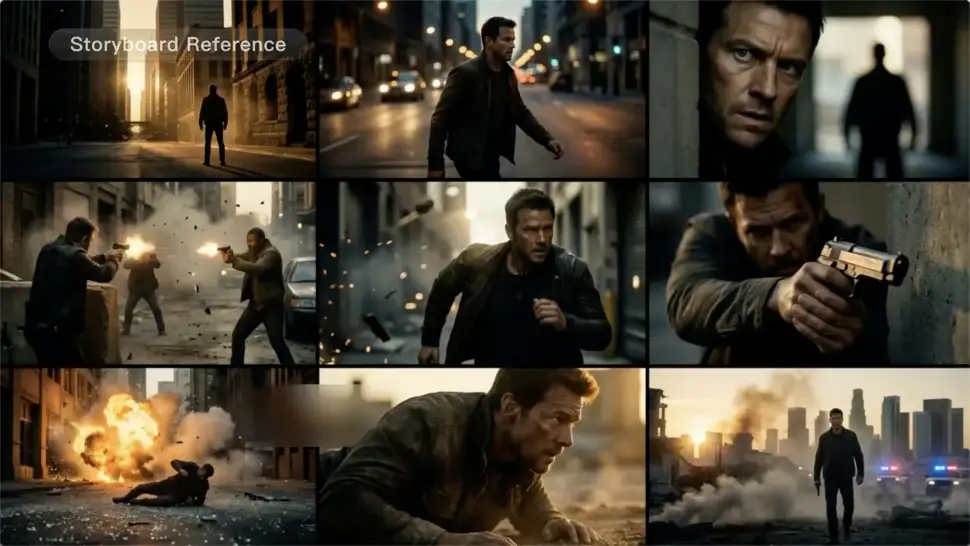
A conversation does not have to stay on one camera angle. An action beat does not have to play out in a single wide shot. Turn on Multi-Shot and Kling can plan scene transitions, framing, and camera-angle changes around what you wrote. A simple story beat can move from an establishing shot to a character close-up, then cut again when the action calls for it.
Take Over the Storyboard When the Shot Matters

Take Over the Storyboard When the Shot Matters

When you already know how the scene should be covered, use Custom Multi-Shot instead of leaving every decision to the model. Decide what happens in each shot, how long it lasts, whether the camera is wide or close, which angle you want, and how the camera moves. It gives you a practical way to turn screenplay direction or a rough shot list into something Kling can generate.

Bring the Same Character into the Next Shot

Bring the Same Character into the Next Shot

A cut should not feel like a new actor walked into the scene. Use a Character Element when someone needs to return across different angles, actions, or settings, and make it clear in the prompt which character belongs in each shot. For workflows that need a richer mix of character, image, video, and scene references, VIDEO 3.0 Omni gives you more ways to anchor the people and visual details your story depends on.

Apps

Image to Video
Image to Video

Image to Video

Text to Video
Text to Video

Text to Video

Omni
Omni

Omni

Digital Human
Digital Human

Digital Human

Restyle
Restyle

Restyle

Text to Image
Text to Image

Text to Image

60M+
60M+
Users
600M+
600M+
AI Videos Generated
4.7 ★
4.7 ★
App Store
Industry-Leading
Industry-Leading
Cinematic 4K

Reviews

KakuDrop

KakuDrop

★★★★★

I have successfully collaborated with world-renowned artists and well-known companies that are recognized globally

Déborah

Déborah

★★★★★

I use Kling AI every day. It's amazing to see the almost daily progress it makes. I used AI for fun at first, and I now find that Kling AI's animations allow me to gain professional visibility, with three times more views on my animated posts than on my static posts.

Jyo John Mulloor

Jyo John Mulloor

★★★★★

Kling AI has been instrumental in transforming my creative workflow, unlocking new dimensions of artistic expression that were once unimaginable. I use Kling AI extensively to develop high-concept visuals, animate surreal dreamscapes, and create AI-assisted films that blur the line between reality and fantasy. Kling AI’s deep learning capabilities have not only enhanced my creative efficiency but also inspired me to explore storytelling in ways I never thought possible.

FAQ

Q1How does an AI Character Generator work?
Q2What can I use AI-generated characters for?
Q3Can I keep the same character consistent across different images?

Bring Your Characters to Life with AI Voices

Create natural voices from text with Kling AI. Turn character dialogue into expressive speech to create realistic character videos.

Native Audio | Multilingual Dialogue | Character Voice Control