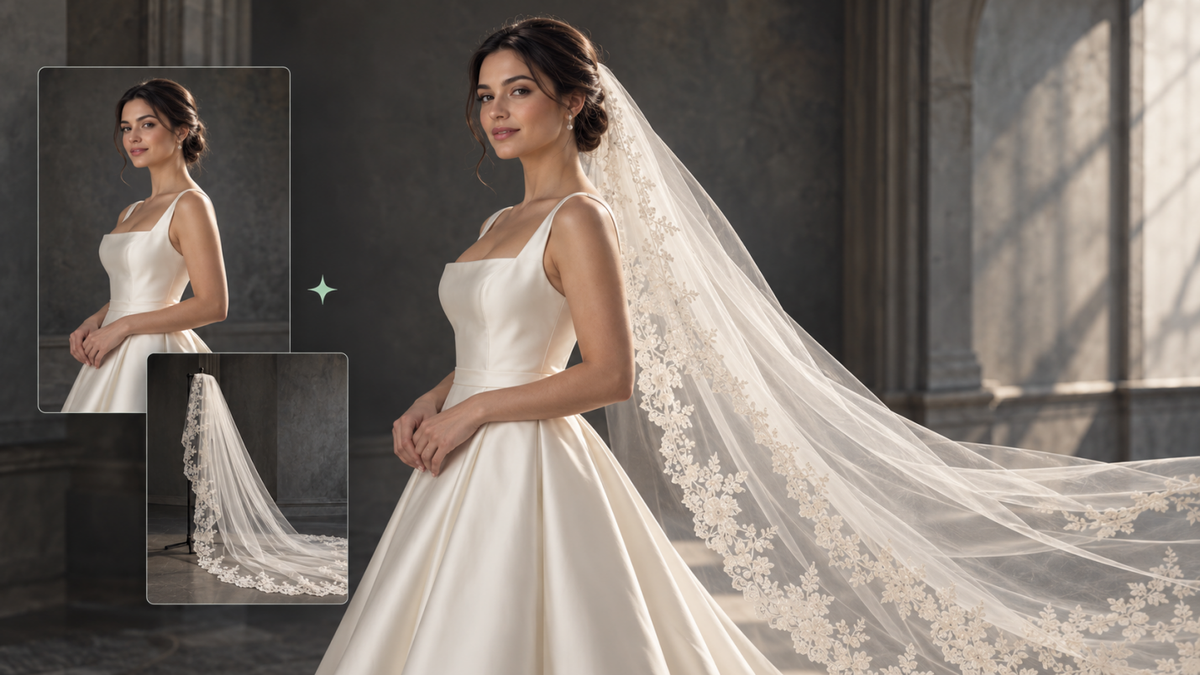
Wondering how a particular veil would look with your dress and hairstyle? An AI virtual try-on wedding veil photo lets you explore the idea using your own portrait, whether you start with a veil reference, a bridal inspiration image, or a written description. It is a way to compare looks before your fitting, not a substitute for seeing the fabric in person.
What Can an AI Wedding Veil Try-On Show You?
You may love the lace on a veil in a boutique photo yet wonder whether it would overwhelm your dress. Previewing it alongside your own hairstyle and silhouette with an AI image generator can make that decision easier before you book a fitting or order samples.
- Veil Length: You can see how a fingertip, chapel, or cathedral veil looks in proportion to your body and dress.
- Balance With Your Dress: Compare a simple veil with an embellished gown, or see whether lace and embroidery compete with existing dress details.
- Placement and Hairstyle: Get a visual sense of how the veil looks behind an updo, over loose hair, or attached around the crown.
- Face Framing: Compare short, face-framing styles with longer veils that shift attention toward the overall silhouette.
- Overall Bridal Direction: See whether a veil moves the same dress toward a classic, minimal, romantic, vintage, or more dramatic look.
To explore these looks on your own photo, try Kling IMAGE 3.0 Omni. Its multi-image reference capabilities let you combine your bridal portrait with a veil reference and optional styling images. By specifying which details to preserve and which to change, you can explore different veil lengths, lace designs, and placements while keeping your face, hairstyle, and wedding dress recognizable. With 2K or 4K image generation, you can also take a closer look at delicate lace, embroidery, and veil textures before your fitting.
The preview only shows the appearance. It cannot tell you the true weight of the fabric, how the veil moves while walking, whether it feels comfortable, or how securely the comb will stay in place. Use it to narrow your options, then confirm the final choice at a fitting.
What Photos Work Best for an AI Wedding Veil Try-On?
The quality of an AI wedding veil try-on largely depends on the source images. If the veil reference is folded, cropped, or partly hidden, or the bride's photo is unclear, the model has less visual information to work with. The table below shows what works best when using an AI wedding photo generator.
Image | What Works Best |
Bride Photo | Clear face and hairline, visible hairstyle, and enough of the dress and body to judge the intended veil length |
Veil Reference | Full veil shape with its length, fabric, transparency, lace, embroidery, trim, or other important visible details |
Optional Style Reference | A bridal image showing the placement, lighting, composition, or mood you want |
For a short veil or face-framing style, a head-and-shoulders portrait usually contains necessary information. If you want to try on a chapel or cathedral veil with the dress and train, you can use a wide or full-body photo. Keep the hairline visible, and use a veil reference that shows its shape and trim. If you don't have a veil photo yet, text-to-image can help you explore a design before choosing a real veil to compare.
How to Create an AI Virtual Try-On Wedding Veil Photo With Kling?
With Kling’s image-to-image AI, you can use one of your existing portraits as the visual anchor, add a veil reference image, and tell the virtual try-on AI model what you expect to change and stay unchanged. For such a workflow, Kling IMAGE 3.0 Omni is an efficient tool because multiple images can guide different parts of the result. Your portrait can define the bride’s face, and another image can define the veil’s features.
Step 1. Upload Your Photo and Veil Reference
Open Kling’s image-generation workspace and select the Kling IMAGE 3.0 Omni model. Upload your bridal photo as the main person reference and the wedding veil you want to preview as the second reference. If you want a specific headpiece or styling detail in the result, add another focused reference image.
Step 2. Write a Prompt That Preserves Your Bridal Look
Kling IMAGE 3.0 Omni supports reference-based generation and multi-reference control, so different images can guide different parts of a composition. Subject consistency helps preserve the bride's recognizable facial features and hairstyle, while reference feature preservation helps carry over visible veil details such as lace, shape, and transparency. Tell the AI image generator which reference supplies each element and which details should stay the same.
Bride Reference (Image 1) | Veil Reference (Image 2) | Generated Image |
.png?x-oss-process=image/resize,w_1872) | .png?x-oss-process=image/resize,w_1872) | .png?x-oss-process=image/resize,w_1872) |
| Prompt: Use Image 1 as the bride reference and Image 2 as the veil reference. Add the veil from Image 2 to the bride, placing it naturally behind her hairstyle and securing it at the crown. Preserve the veil’s shape, length, lace trim, and transparency. Keep the bride’s face, hairstyle, expression, wedding dress, pose, bouquet, background, composition, and lighting unchanged. | ||
Step 3. Generate, Review, and Compare
Choose your preferred aspect ratio and 2K or 4K resolution, then generate your wedding veil preview. Review the bride's facial features, hairstyle, veil placement, lace details, and overall lighting against the original references. You can also find a bridal look you like online and use AI face swap with your own portrait to preview how the wedding veil and dress might look on you.
Bride Reference | Portrait Reference | Generated Result |
.png?x-oss-process=image/resize,w_1872) | .png?x-oss-process=image/resize,w_1872) | .png?x-oss-process=image/resize,w_1872) |
| Prompt: Use the Bridal Reference image to guide the gown, veil, pose, and overall styling. Use the Portrait Reference for my facial identity. Show how the bridal look might appear on me while keeping the veil shape, gown details, lighting, and composition consistent. Keep my facial features natural and recognizable. | ||
Wedding Veil Styles You Can Preview With AI
With a portrait that works well, you can reuse it to compare different veil lengths and designs. Keep the bride consistent so that you can see what each veil changes about the overall look. The table below outlines the main veil styles and the visual effect each creates:
Veil Style | What You Can Compare |
Cathedral Veil | Long and dramatic, extending well past the train |
Chapel Veil | Formal with moderate length, grazing the floor |
Fingertip Veil | Balanced and versatile, ending around the hands |
Shoulder Veil | Short and lightweight, framing the upper body |
Blusher Veil | Covers or frames the face, often worn layered |
Lace-edge Veil | Adds decorative detail along the border |
A veil’s style name only tells part of the story. Two cathedral veils can differ in lace, volume, and transparency, so a photo of the actual veil helps you preview those details more closely. If you’re still choosing your wedding dress, Kling’s AI Clothes Changer lets you combine your own photo with wedding dress references to preview different bridal looks. Compare various silhouettes, necklines, and embellishments to find a gown that complements your favorite veil before visiting a bridal salon.
Fix Common Problems in AI Wedding Veil Previews
A realistic AI virtual try-on wedding veil photo mainly depends on clear visual information. If a preview looks off, an AI image editor can help you focus on the specific detail that needs attention. The table below pairs common issues with a practical change to the reference or prompt.
Problem | What to Change |
Veil covers the face incorrectly | Specify whether it should sit behind the hair, over the head, or across the face as a blusher |
Hairstyle changes | Add the hairstyle to the details that must remain unchanged |
Veil shape or length looks wrong | Use a clearer reference that shows the full veil and state the intended length |
Lace or embroidery disappears | Use a sharper veil reference and explicitly ask to preserve that detail |
Bride looks different | Strengthen the identity-preservation instruction and use a clearer portrait |
Veil lighting looks artificial | Ask the veil to follow the direction, softness, and exposure of the original scene |
Dress changes unexpectedly | State that the original gown, neckline, fabric, and embellishments should remain unchanged |
The End
An AI virtual try-on wedding veil photo can help you narrow down veil styles before the fitting by comparing styles on your own face, hairstyle, and dress. Start with clear references, define placement carefully, retain key details, and change one variable at a time. For consistent multi-reference editing and detailed outputs, try Kling IMAGE 3.0 Omni.
FAQs
Can AI Show Me What I Look Like in a Wedding Veil?
Yes. AI can combine a clear bridal portrait with a wedding veil reference to create a visual preview. This lets you see the veil with your own face, hairstyle, dress, and proportions instead of judging it on another model. Use the result to compare styles, lengths, and placement, but remember that it cannot confirm physical fit or comfort.
Can I Use a Bridal Inspiration Photo Without Buying the Same Dress?
Yes. An inspirational photo can help you explore the overall look of a veil and gown together before making a purchase. Treat the result as a visual direction rather than a reliable representation of fit, tailoring, or fabric. If you want to test a specific veil, include its own reference image.
Can AI Help Me Choose Between Lace and Plain Veils?
AI previews can make the difference in visual balance easier to see. Compare how a lace-edged veil sits beside an embellished neckline or how a plain tulle veil works with a detailed dress. The preview can guide your shortlist, but the final choice still depends on real fabric and styling.
Is an AI Wedding Veil Preview Accurate Enough to Order From?
Not on its own. AI can help with the overall silhouette and styling, but it may not reproduce the precise length, fabric weight, embroidery, or drape of the physical veil. Check product measurements and photos, and confirm the fit with the seller or during a fitting.
Can I Preview a Veil With My Wedding Hairstyle Before the Trial?
Yes. A portrait showing the hairstyle you plan to wear can help you explore how different attachment positions might look. If you have not chosen a hairstyle yet, compare a few styling references. A hairstylist can still advise on comb placement and how securely the veil will sit.
What Should I Ask a Bridal Boutique After Comparing AI Previews?
Ask about the actual veil length, fabric type, comb attachment, available trim options, and whether the veil can be tried with your gown. Bring the preview as a visual reference, but rely on the boutique’s product details and an in-person fitting for the final decision.