Creative Studio
API
Resources
About Us
Download

act 2 scene 1 - shape morphing & combat movement

Uncover emotional resilience and strategic gameplay through detailed, frame-by-frame animation. Start exploring act 2 scene 1 ideas and generate your own content with AI.

act 2 scene 1 - shape morphing & combat movement

Recommended

2 vs 1 anime - act 2 scene 1 AI video
Erran avatar
Erran
2倍に増えるお札 - act 2 scene 1 AI video
SpyUrsoz avatar
SpyUrsoz
Kling AI work 310160485521756 - act 2 scene 1 AI image
UfSRBHgS avatar
UfSRBHgS
Promt Text #1 - act 2 scene 1 AI image
uDlNqTXF avatar
uDlNqTXF
1 - act 2 scene 1 AI image
WW67pocoio avatar
WW67pocoio
Kling AI work 314984433613926 - act 2 scene 1 AI video
SDTrpOct avatar
SDTrpOct
Scene 1 - act 2 scene 1 AI video
oOlHPSZU avatar
oOlHPSZU
Kling AI work 316546127527785 - act 2 scene 1 AI image
Higgins Media ad avatar
Higgins Media ad
2 vs 1 first part - act 2 scene 1 AI video
Erran avatar
Erran
Scene 2 - act 2 scene 1 AI video
themustangpilot avatar
themustangpilot
Kling AI work 313533787664665 - act 2 scene 1 AI video
aimovies avatar
aimovies
Kling AI work 312404248523621 - act 2 scene 1 AI video
fkFHbjuq avatar
fkFHbjuq
the start of a 2 vs 1 - act 2 scene 1 AI video
Erran avatar
Erran
Part 1 - act 2 scene 1 AI video
wFDAZSep avatar
wFDAZSep
イグニス2 -ignis 2- - act 2 scene 1 AI image
Hiro-AI_img avatar
Hiro-AI_img
Scene 1 - act 2 scene 1 AI video
jZgxewug avatar
jZgxewug
roblox scene 2 - act 2 scene 1 AI video
Zaros avatar
Zaros
Scene 1 - act 2 scene 1 AI video
Kopf avatar
Kopf
Skit Scene 1 - act 2 scene 1 AI video
TpFWYKGs avatar
TpFWYKGs

How to Master AI Motion Control in 3 Steps

Upload Your Assets

Upload Your Assets

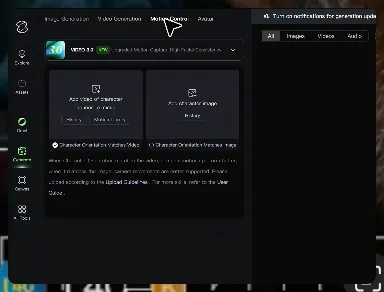
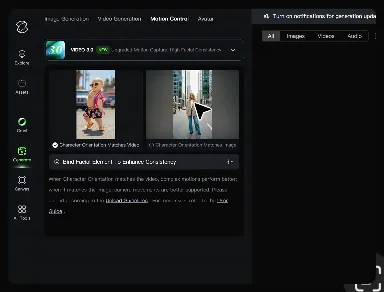
Provide a static character image and a motion reference video showing the exact expressions you want to replicate.

Bind Face Subject

Bind Face Subject

Enable this feature to lock facial consistency. Upload multi-angle photos to create a precise facial reference map.

Generate & Export

Generate & Export

Process your motion-controlled video and download the final render in high resolution.

Key Features of Kling AI Text-to-Image Generator

Create Detailed Images From Text Prompts

Create Detailed Images From Text Prompts

Turn your text descriptions into detailed images with Kling AI. Describe the subject, scene, style, and composition you want, and the model transforms your prompt into visuals that match your creative direction. Create realistic portraits, cinematic scenes, product visuals, and artistic images directly from text.

Keep Characters And Visual Elements Consistent

Keep Characters And Visual Elements Consistent

Create characters and visual concepts that remain consistent across different images. Kling IMAGE 3.0 uses reference images to preserve important details, including appearance, clothing, objects, and overall style. This makes it easier to create character designs, brand visuals, and image series with a consistent look.

Explore Different Styles And Variations

Explore Different Styles And Variations

Explore different visual directions with prompts and reference images. Adjust composition, perspective, lighting, and style to create new variations while keeping the main concept consistent. This helps you test different ideas and develop visuals for artwork, marketing materials, and creative projects.

Apps

Image to Video
Image to Video

Image to Video

Text to Video
Text to Video

Text to Video

Omni
Omni

Omni

Digital Human
Digital Human

Digital Human

Restyle
Restyle

Restyle

Text to Image
Text to Image

Text to Image

60M+
60M+
Users
600M+
600M+
AI Videos Generated
4.7 ★
4.7 ★
App Store
Industry-Leading
Industry-Leading
Cinematic 4K

Reviews

Vincent Smadja

Vincent Smadja

★★★★★

Kling AI seamlessly integrates into my creative workflow, playing a key role in transforming my images. After generating and upscaling an image, Kling becomes a crucial element, bringing my creations to life with movement and depth.

PJ Ace

PJ Ace

★★★★★

Kling AI has made it easy for us to generate world class visuals for Fortune 500 companies, TV shows and music for big artists. We love the easy of use of the platform and the quality of the generations. My first time using Kling AI, I got 22 million views on just one video. It's that good.

Samuele Poggi (@visualsk2)

Samuele Poggi (@visualsk2)

★★★★★

I use Kling AI daily to push the limits of AI filmmaking. It allows me to create highly cinematic content, blending AI and VFX to develop innovative projects. It has significantly impacted my creative process, enabling me to achieve complex animations that would otherwise require high production budgets.

FAQ

Q1Can I use this for global AI video marketing?
Q2What’s the difference between Video 2.6 and 3.0?
Q3How long can videos be in Video 3.0?

Experience Video 3.0 on Kling

Create cinematic, multi-shot videos with native audio and precise control—all in one generation.

Native audio | Multi-shot control | Up to 15s continuous output