Creative Studio
API
Resources
Features
About Us
Download

Cake Wallpaper Ideas – AI-Generated Designs

Find cake wallpaper ideas generated by AI. Explore a variety of AI-inspired designs and quickly discover the perfect match for your sweet space. Easy to customize and use.

Cake Wallpaper Ideas – AI-Generated Designs

Recommended

Kling AI work 306974465667732 - cake wallpaper AI video
onglmnSd avatar
onglmnSd
Cake - cake wallpaper AI video
Designbkk avatar
Designbkk
ASMR Capybara eating cake - cake wallpaper AI video
lunarethil avatar
lunarethil
CRYSTAL CAKE - cake wallpaper AI video
sahila avatar
sahila
Cake lady - cake wallpaper AI image
eiai avatar
eiai
Kling AI work 320827856523297 - cake wallpaper AI video
dkOdDdKE avatar
dkOdDdKE
Would you like to eat this cake? - cake wallpaper AI video
EYAlVvWg avatar
EYAlVvWg
Kling AI work 316167040661150 - cake wallpaper AI video
bsiBMDOr avatar
bsiBMDOr
Cake lady - cake wallpaper AI image
eiai avatar
eiai
ASMR Capybara eating cake - cake wallpaper AI video
lunarethil avatar
lunarethil
Kling AI work 298783296506338 - cake wallpaper AI video
kaspxRes avatar
kaspxRes
Kling AI work 310666257524034 - cake wallpaper AI image
QtQJFecs avatar
QtQJFecs
Toffee cake - cake wallpaper AI image
qITdnZEI avatar
qITdnZEI
Strawberry Cake - cake wallpaper AI image
7A7PI avatar
7A7PI
Elite Creator
Choc passion fruit coconut cake - cake wallpaper AI image
faEMXURc avatar
faEMXURc
🎃 Cute Halloween Cake Ideas 🧡  - cake wallpaper AI video
oneworldsofie avatar
oneworldsofie
Cake lady - cake wallpaper AI image
eiai avatar
eiai
Best cake for the latest couple  - cake wallpaper AI image
JOBSDWke avatar
JOBSDWke
Kling AI work 310335821661328 - cake wallpaper AI image
Dreaming avatar
Dreaming
Elite Creator

How to Create an AI Avatar Video

Create an Avatar

Create an Avatar

Pick a ready-made character from the Avatar Library, return to a saved avatar, upload an image from your device or Assets, or generate someone new with AI Image. The selected image becomes the visual starting point for the video.

Add the Voice

Add the Voice

Upload a finished recording, or enter the lines you want the character to deliver. With text to speech, select a voice and adjust its speed and emotional tone. Use punctuation to place pauses where they naturally belong, especially in longer passages.

Shape the Performance

Shape the Performance

Describe how the character should feel, react, and move while speaking. You can write the direction yourself or begin with one of the performance options Kling AI suggests for the selected character. Generate the video and review the delivery.

Go from Written Scene to Directed Sequence

See Your Scene as More Than One Shot

See Your Scene as More Than One Shot

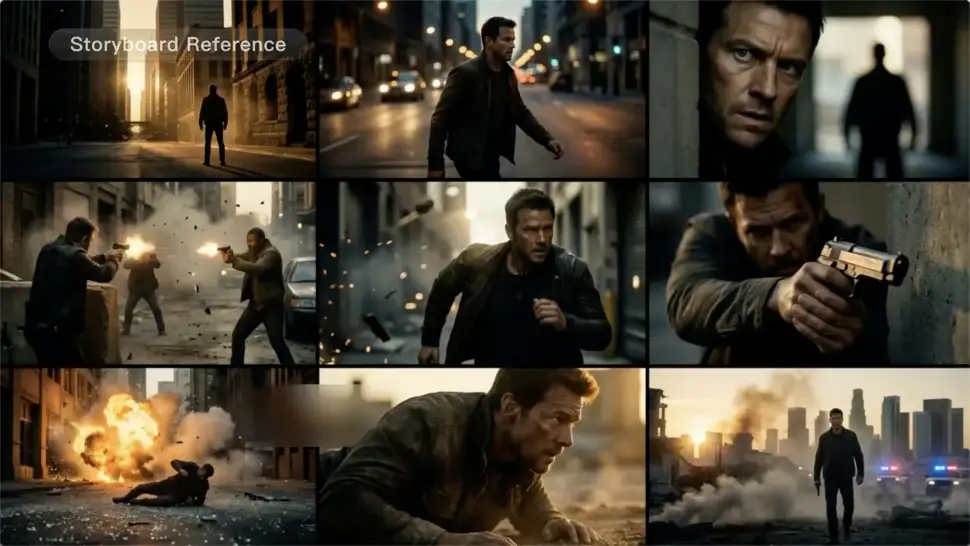
A conversation does not have to stay on one camera angle. An action beat does not have to play out in a single wide shot. Turn on Multi-Shot and Kling can plan scene transitions, framing, and camera-angle changes around what you wrote. A simple story beat can move from an establishing shot to a character close-up, then cut again when the action calls for it.
Take Over the Storyboard When the Shot Matters

Take Over the Storyboard When the Shot Matters

When you already know how the scene should be covered, use Custom Multi-Shot instead of leaving every decision to the model. Decide what happens in each shot, how long it lasts, whether the camera is wide or close, which angle you want, and how the camera moves. It gives you a practical way to turn screenplay direction or a rough shot list into something Kling can generate.

Bring the Same Character into the Next Shot

Bring the Same Character into the Next Shot

A cut should not feel like a new actor walked into the scene. Use a Character Element when someone needs to return across different angles, actions, or settings, and make it clear in the prompt which character belongs in each shot. For workflows that need a richer mix of character, image, video, and scene references, VIDEO 3.0 Omni gives you more ways to anchor the people and visual details your story depends on.

Apps

Image to Video
Image to Video

Image to Video

Text to Video
Text to Video

Text to Video

Omni
Omni

Omni

Digital Human
Digital Human

Digital Human

Restyle
Restyle

Restyle

Text to Image
Text to Image

Text to Image

60M+
60M+
Users
600M+
600M+
AI Videos Generated
4.7 ★
4.7 ★
App Store
Industry-Leading
Industry-Leading
Cinematic 4K

Reviews

PJ Ace

PJ Ace

★★★★★

Kling AI has made it easy for us to generate world class visuals for Fortune 500 companies, TV shows and music for big artists. We love the easy of use of the platform and the quality of the generations. My first time using Kling AI, I got 22 million views on just one video. It's that good.

James Phillips

James Phillips

★★★★★

Kling AI has transformed my workflow by collapsing timelines and democratizing production. It’s shifted my mindset from resource-dependent filmmaking to a boundless creative sandbox, where experimentation yields unexpected beauty.

Huang Lu (Elson)

Huang Lu (Elson)

★★★★★

I’ve been using Kling AI since its initial release, and it’s remained one of the leading AI media generators ever since. With Kling AI, I’ve created hundreds of videos, collectively amassing millions of views.

FAQ

Q1How do I remove the background from a video?
Q2Can I remove a video background without a green screen?
Q3Can I use an image to change a video background?

Give Photos and Videos a Whole New Face

Upload your photo or video, add the face you want to swap in, and let Kling AI recreate the scene while keeping the look, motion, and surroundings feeling natural.

Effortless Face Swaps | Facial Detail Control | Natural Blending