Creative Studio
API
Resources
Features
About Us
Download

AI galaxy lip sync ideas – Unique inspirations

Discover unique AI galaxy lip sync ideas. Get quick inspiration and customize themes and styles for your projects. Create stunning visuals with ease.

AI galaxy lip sync ideas – Unique inspirations

Recommended

lip sync - galaxy lip sync AI video
POPONE avatar
POPONE
Elite Creator
lip sync - galaxy lip sync AI video
POPONE avatar
POPONE
Elite Creator
Kling AI work 316267879662025 - galaxy lip sync AI video
wZquotcj avatar
wZquotcj
Kling AI work 304789970537207 - galaxy lip sync AI video
G.I.N avatar
G.I.N
Pls follow  - galaxy lip sync AI video
MAX_TT avatar
MAX_TT
lip sync - galaxy lip sync AI video
POPONE avatar
POPONE
Elite Creator
Motion Control + Lip Sync - galaxy lip sync AI video
KEETY avatar
KEETY
Elite Creator
Kling AI work 310414580664532 - galaxy lip sync AI video
vFQxxOiE avatar
vFQxxOiE
Kling AI work 316396373500924 - galaxy lip sync AI video
nCtOKcFW avatar
nCtOKcFW
Kling AI work 316513779505763 - galaxy lip sync AI image
qeLqetPK avatar
qeLqetPK
lip sync attempt - galaxy lip sync AI video
fseaPIOM avatar
fseaPIOM
Lip sync - galaxy lip sync AI video
00:25
CKNazrIw avatar
CKNazrIw
Kling AI work 299741178657181 - galaxy lip sync AI video
MRwmmvQy avatar
MRwmmvQy
Lip sync test - galaxy lip sync AI video
oXNHFyaz avatar
oXNHFyaz
Me Lip Sync Tool - galaxy lip sync AI video
EpbmNHYv avatar
EpbmNHYv
lip sync - galaxy lip sync AI video
POPONE avatar
POPONE
Elite Creator
Lip sync - galaxy lip sync AI video
POPONE avatar
POPONE
Elite Creator
Kling AI work 307733273535954 - galaxy lip sync AI video
CTVBkYmK avatar
CTVBkYmK
I Go Pay Lip Sync - galaxy lip sync AI video
Dj Mohzaic avatar
Dj Mohzaic

How to Create an AI Avatar Video

Create an Avatar

Create an Avatar

Pick a ready-made character from the Avatar Library, return to a saved avatar, upload an image from your device or Assets, or generate someone new with AI Image. The selected image becomes the visual starting point for the video.

Add the Voice

Add the Voice

Upload a finished recording, or enter the lines you want the character to deliver. With text to speech, select a voice and adjust its speed and emotional tone. Use punctuation to place pauses where they naturally belong, especially in longer passages.

Shape the Performance

Shape the Performance

Describe how the character should feel, react, and move while speaking. You can write the direction yourself or begin with one of the performance options Kling AI suggests for the selected character. Generate the video and review the delivery.

Go from Written Scene to Directed Sequence

See Your Scene as More Than One Shot

See Your Scene as More Than One Shot

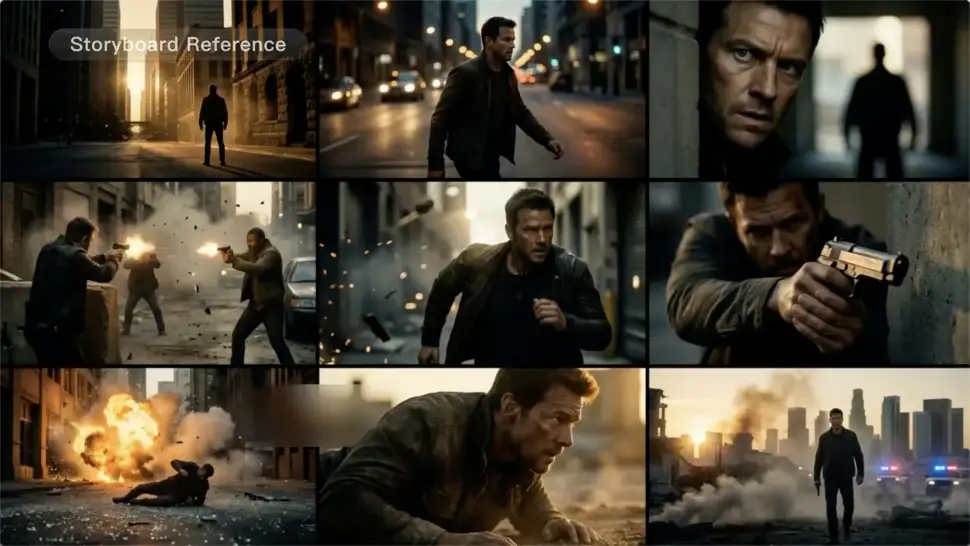
A conversation does not have to stay on one camera angle. An action beat does not have to play out in a single wide shot. Turn on Multi-Shot and Kling can plan scene transitions, framing, and camera-angle changes around what you wrote. A simple story beat can move from an establishing shot to a character close-up, then cut again when the action calls for it.
Take Over the Storyboard When the Shot Matters

Take Over the Storyboard When the Shot Matters

When you already know how the scene should be covered, use Custom Multi-Shot instead of leaving every decision to the model. Decide what happens in each shot, how long it lasts, whether the camera is wide or close, which angle you want, and how the camera moves. It gives you a practical way to turn screenplay direction or a rough shot list into something Kling can generate.

Bring the Same Character into the Next Shot

Bring the Same Character into the Next Shot

A cut should not feel like a new actor walked into the scene. Use a Character Element when someone needs to return across different angles, actions, or settings, and make it clear in the prompt which character belongs in each shot. For workflows that need a richer mix of character, image, video, and scene references, VIDEO 3.0 Omni gives you more ways to anchor the people and visual details your story depends on.

Apps

Image to Video
Image to Video

Image to Video

Text to Video
Text to Video

Text to Video

Omni
Omni

Omni

Digital Human
Digital Human

Digital Human

Restyle
Restyle

Restyle

Text to Image
Text to Image

Text to Image

60M+
60M+
Users
600M+
600M+
AI Videos Generated
4.7 ★
4.7 ★
App Store
Industry-Leading
Industry-Leading
Cinematic 4K

Reviews

KakuDrop

KakuDrop

★★★★★

I have successfully collaborated with world-renowned artists and well-known companies that are recognized globally

PJ Ace

PJ Ace

★★★★★

Kling AI has made it easy for us to generate world class visuals for Fortune 500 companies, TV shows and music for big artists. We love the easy of use of the platform and the quality of the generations. My first time using Kling AI, I got 22 million views on just one video. It's that good.

Maria Rubtsova

Maria Rubtsova

★★★★★

I’m Maria Rubtsova, an AIGC digital artist passionate about creating stunning visuals in the worlds of fashion, aesthetics, and fantasy. I use KlingAi to bring imagination to life through video. My work is all about exploring beauty, emotion, and the limitless possibilities of digital art.

FAQ

Q1Can I generate 4K videos from an image?
Q2Is this image to video AI free to use?
Q3Can I make the character in my image speak?

Start Controlling Character Motion

Stop accepting distorted AI movements. Upload your reference and let Kling replicate it precisely.

Works on humans, anime & 3D | High-precision motion | Zero distortion