Creative Studio
API
Resources
About Us
Download

Labubu Scene Ideas – AI-Generated Concepts

Explore a variety of AI-generated Labubu scene ideas. Quickly find inspiration and customize to your needs with AI assistance.

Labubu Scene Ideas – AI-Generated Concepts

Recommended

Labubu with raibow hearts - labubu scene AI video
Kirill Inozz avatar
Kirill Inozz
Kling AI work 293621412537520 - labubu scene AI video
Jeniffer avatar
Jeniffer
Kling AI work 309323479616718 - labubu scene AI image
omkVZWaW avatar
omkVZWaW
Kling AI work 293917098663742 - labubu scene AI video
FEtupIDh avatar
FEtupIDh
? - labubu scene AI video
Maker0603 avatar
Maker0603
Kling AI work 304762709506670 - labubu scene AI video
oiffRCKS avatar
oiffRCKS
Kling AI work 292021288502605 - labubu scene AI video
aeExMuDS avatar
aeExMuDS
roblox vs labubu - labubu scene AI video
World Stunts avatar
World Stunts
Elite Creator
Kling AI work 295598775616278 - labubu scene AI video
carlos avatar
carlos
Kling AI work 291317027504142 - labubu scene AI video
ksTCzsjG avatar
ksTCzsjG
Kling AI work 306266208611228 - labubu scene AI video
xgevGPMz avatar
xgevGPMz
Labubu - labubu scene AI video
00:16
DTXnRBxp avatar
DTXnRBxp
Kling AI work 312409648528632 - labubu scene AI video
LabubuViiibes avatar
LabubuViiibes
Kling AI work 306264104650490 - labubu scene AI video
xgevGPMz avatar
xgevGPMz
Kling AI work 311488345668581 - labubu scene AI video
funny labubu avatar
funny labubu
Kling AI work 313071817525700 - labubu scene AI video
cRwxlpDG avatar
cRwxlpDG
Kling AI work 294817654500189 - labubu scene AI video
FftvfYto avatar
FftvfYto

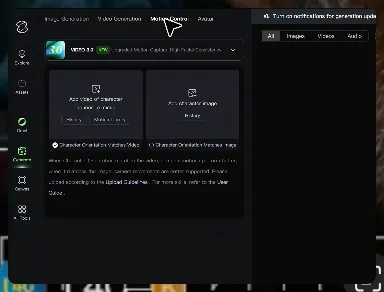
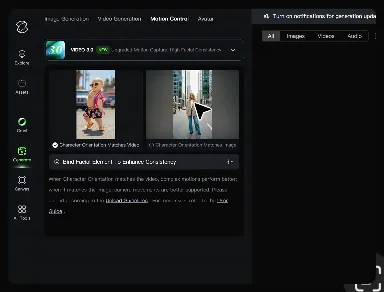
How to Master AI Motion Control in 3 Steps

Upload Your Assets

Upload Your Assets

Provide a static character image and a motion reference video showing the exact expressions you want to replicate.

Bind Face Subject

Bind Face Subject

Enable this feature to lock facial consistency. Upload multi-angle photos to create a precise facial reference map.

Generate & Export

Generate & Export

Process your motion-controlled video and download the final render in high resolution.

Key Features of Kling AI Text-to-Image Generator

Create Detailed Images From Text Prompts

Create Detailed Images From Text Prompts

Turn your text descriptions into detailed images with Kling AI. Describe the subject, scene, style, and composition you want, and the model transforms your prompt into visuals that match your creative direction. Create realistic portraits, cinematic scenes, product visuals, and artistic images directly from text.

Keep Characters And Visual Elements Consistent

Keep Characters And Visual Elements Consistent

Create characters and visual concepts that remain consistent across different images. Kling IMAGE 3.0 uses reference images to preserve important details, including appearance, clothing, objects, and overall style. This makes it easier to create character designs, brand visuals, and image series with a consistent look.

Explore Different Styles And Variations

Explore Different Styles And Variations

Explore different visual directions with prompts and reference images. Adjust composition, perspective, lighting, and style to create new variations while keeping the main concept consistent. This helps you test different ideas and develop visuals for artwork, marketing materials, and creative projects.

Apps

Image to Video
Image to Video

Image to Video

Text to Video
Text to Video

Text to Video

Omni
Omni

Omni

Digital Human
Digital Human

Digital Human

Restyle
Restyle

Restyle

Text to Image
Text to Image

Text to Image

60M+
60M+
Users
600M+
600M+
AI Videos Generated
4.7 ★
4.7 ★
App Store
Industry-Leading
Industry-Leading
Cinematic 4K

Reviews

Samuele Poggi (@visualsk2)

Samuele Poggi (@visualsk2)

★★★★★

I use Kling AI daily to push the limits of AI filmmaking. It allows me to create highly cinematic content, blending AI and VFX to develop innovative projects. It has significantly impacted my creative process, enabling me to achieve complex animations that would otherwise require high production budgets.

Jyo John Mulloor

Jyo John Mulloor

★★★★★

Kling AI has been instrumental in transforming my creative workflow, unlocking new dimensions of artistic expression that were once unimaginable. I use Kling AI extensively to develop high-concept visuals, animate surreal dreamscapes, and create AI-assisted films that blur the line between reality and fantasy. Kling AI’s deep learning capabilities have not only enhanced my creative efficiency but also inspired me to explore storytelling in ways I never thought possible.

KakuDrop

KakuDrop

★★★★★

I have successfully collaborated with world-renowned artists and well-known companies that are recognized globally

FAQ

Q1What’s the difference between Video 2.6 and 3.0?
Q2Is it suitable for product demo videos?
Q3What is Kling Video 3.0?

Experience Video 3.0 on Kling

Create cinematic, multi-shot videos with native audio and precise control—all in one generation.

Native audio | Multi-shot control | Up to 15s continuous output