Creative Studio
API
Resources
Features
About Us
Download

lancer art - modern art & chaotic studio explosion

Immerse in the vibrant world of lancer art through dynamic modern art studies and explosive art studio chaos. Start exploring lancer art ideas and generate your own content with AI.

lancer art - modern art & chaotic studio explosion

Recommended

Kling AI work 321649298652876 - lancer art AI video
VxKYeBuy avatar
VxKYeBuy
Then and Now. Old but Gold. - lancer art AI video
Burn Complete 🔥 avatar
Burn Complete 🔥
Art - lancer art AI video
xSdfiQsG avatar
xSdfiQsG
scifi mech robot - lancer art AI image
Iceblossom avatar
Iceblossom
Kling AI work 321648309664005 - lancer art AI video
VxKYeBuy avatar
VxKYeBuy
Art Noveau  - lancer art AI image
EvelinevanHoek avatar
EvelinevanHoek
*Fun and Art* - lancer art AI image
*Midcoast* avatar
*Midcoast*
Martial Art - lancer art AI video
CD_SinemaAi avatar
CD_SinemaAi
Elite Creator
my art works - lancer art AI image
WvazmHbD avatar
WvazmHbD
art work - lancer art AI image
WvazmHbD avatar
WvazmHbD
Kling AI work 314468575522788 - lancer art AI video
jFKtAQsl avatar
jFKtAQsl
Kling AI work 303575133615808 - lancer art AI video
JGslEilZ avatar
JGslEilZ
Conceptual art  - lancer art AI video
rYeRcdhE avatar
rYeRcdhE
Mushroom Witch Concept Art - lancer art AI image
nave312 avatar
nave312
Kling AI work 317833561666316 - lancer art AI image
UxOEfArz avatar
UxOEfArz
art!  - lancer art AI video
Spinning Cards
vLFlUXmX avatar
vLFlUXmX
A work of art - lancer art AI video
Root and Rise studio avatar
Root and Rise studio

How to Create an AI Avatar Video

Create an Avatar

Create an Avatar

Pick a ready-made character from the Avatar Library, return to a saved avatar, upload an image from your device or Assets, or generate someone new with AI Image. The selected image becomes the visual starting point for the video.

Add the Voice

Add the Voice

Upload a finished recording, or enter the lines you want the character to deliver. With text to speech, select a voice and adjust its speed and emotional tone. Use punctuation to place pauses where they naturally belong, especially in longer passages.

Shape the Performance

Shape the Performance

Describe how the character should feel, react, and move while speaking. You can write the direction yourself or begin with one of the performance options Kling AI suggests for the selected character. Generate the video and review the delivery.

Go from Written Scene to Directed Sequence

See Your Scene as More Than One Shot

See Your Scene as More Than One Shot

A conversation does not have to stay on one camera angle. An action beat does not have to play out in a single wide shot. Turn on Multi-Shot and Kling can plan scene transitions, framing, and camera-angle changes around what you wrote. A simple story beat can move from an establishing shot to a character close-up, then cut again when the action calls for it.
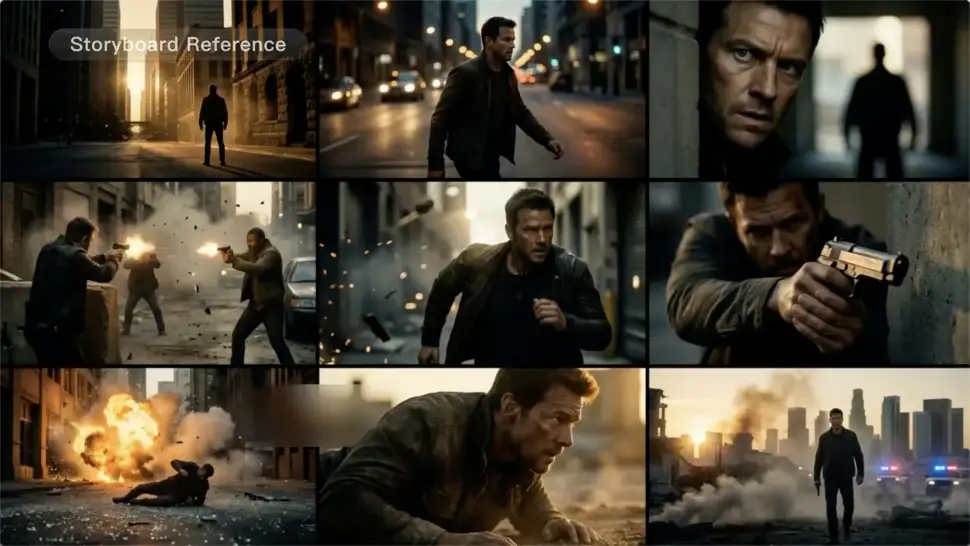
Take Over the Storyboard When the Shot Matters

Take Over the Storyboard When the Shot Matters

When you already know how the scene should be covered, use Custom Multi-Shot instead of leaving every decision to the model. Decide what happens in each shot, how long it lasts, whether the camera is wide or close, which angle you want, and how the camera moves. It gives you a practical way to turn screenplay direction or a rough shot list into something Kling can generate.

Bring the Same Character into the Next Shot

Bring the Same Character into the Next Shot

A cut should not feel like a new actor walked into the scene. Use a Character Element when someone needs to return across different angles, actions, or settings, and make it clear in the prompt which character belongs in each shot. For workflows that need a richer mix of character, image, video, and scene references, VIDEO 3.0 Omni gives you more ways to anchor the people and visual details your story depends on.

Apps

Image to Video
Image to Video

Image to Video

Text to Video
Text to Video

Text to Video

Omni
Omni

Omni

Digital Human
Digital Human

Digital Human

Restyle
Restyle

Restyle

Text to Image
Text to Image

Text to Image

60M+
60M+
Users
600M+
600M+
AI Videos Generated
4.7 ★
4.7 ★
App Store
Industry-Leading
Industry-Leading
Cinematic 4K

Reviews

KakuDrop

KakuDrop

★★★★★

I have successfully collaborated with world-renowned artists and well-known companies that are recognized globally

Halim Alrasihi

Halim Alrasihi

★★★★★

I use AI daily and Kling AI is a crucial part of my workflow, whether for client work or personal projects. What I love most about using Kling AI is that it provides all the tools I need in one place, from keyframes to character references, elements and special effects.

Jyo John Mulloor

Jyo John Mulloor

★★★★★

Kling AI has been instrumental in transforming my creative workflow, unlocking new dimensions of artistic expression that were once unimaginable. I use Kling AI extensively to develop high-concept visuals, animate surreal dreamscapes, and create AI-assisted films that blur the line between reality and fantasy. Kling AI’s deep learning capabilities have not only enhanced my creative efficiency but also inspired me to explore storytelling in ways I never thought possible.

FAQ

Q1Is this the same as Kling AI Avatar?
Q2How Do I Make an Avatar of Myself?
Q3Can I change my avatar’s hairstyle, clothes, or accessories?

Give the Subject a Better Setting

Create a new setting while keeping your subject recognizable. Use prompts and visual references to shape backgrounds for portraits, product visuals, and campaign creative.