Creative Studio
API
Resources
Features
About Us
Download

landscape to portrait converter video ai - nature & surreal

Transform serene natural landscapes into captivating portraits with our AI-driven video converter, blending traditional East Asian styles with surreal and post-apocalyptic themes. Start exploring landscape to portrait converter video ai ideas and generate your own content with AI.

landscape to portrait converter video ai - nature & surreal

Recommended

split-face couple portrait - landscape to portrait converter video ai AI image
souvenir avatar
souvenir
Kling AI work 313768630500455 - landscape to portrait converter video ai AI video
bPsmQmLF avatar
bPsmQmLF
Kling AI work 316177906667774 - landscape to portrait converter video ai AI video
DoNPNjHS avatar
DoNPNjHS
Use the uploaded portrait as the - landscape to portrait converter video ai AI image
ymXZOOxR avatar
ymXZOOxR
Kling AI work 320020191613518 - landscape to portrait converter video ai AI image
fBVSests avatar
fBVSests
Kling AI work 319551857664778 - landscape to portrait converter video ai AI video
OzDMpUYW avatar
OzDMpUYW
Kling AI work 317890623661602 - landscape to portrait converter video ai AI video
cJdYHalw avatar
cJdYHalw
video 
 - landscape to portrait converter video ai AI image
CRwwFQZq avatar
CRwwFQZq
Kling AI work 318980378506844 - landscape to portrait converter video ai AI video
QyjbpGlg avatar
QyjbpGlg
Kling AI work 314344272614116 - landscape to portrait converter video ai AI image
sRREyHez avatar
sRREyHez
Kling AI work 319480005528748 - landscape to portrait converter video ai AI video
MsmUvXFy avatar
MsmUvXFy
Kling AI work 315764022505145 - landscape to portrait converter video ai AI video
dUFVdjuW avatar
dUFVdjuW
Kling AI work 319531849528963 - landscape to portrait converter video ai AI video
FQjoyRVv avatar
FQjoyRVv
Kling AI work 316638801660997 - landscape to portrait converter video ai AI image
GemvKwKz avatar
GemvKwKz
Kling AI work 314283784665466 - landscape to portrait converter video ai AI video
oBoQPwun avatar
oBoQPwun
Kling AI work 315758375528808 - landscape to portrait converter video ai AI video
dUFVdjuW avatar
dUFVdjuW
realistic woman portrait - landscape to portrait converter video ai AI video
KLING2658 avatar
KLING2658
living portrait from a photo - landscape to portrait converter video ai AI video
TORA avatar
TORA
Half-face portrait - landscape to portrait converter video ai AI image
yXkoyhXH avatar
yXkoyhXH

How to Create an AI Avatar Video

Create an Avatar

Create an Avatar

Pick a ready-made character from the Avatar Library, return to a saved avatar, upload an image from your device or Assets, or generate someone new with AI Image. The selected image becomes the visual starting point for the video.

Add the Voice

Add the Voice

Upload a finished recording, or enter the lines you want the character to deliver. With text to speech, select a voice and adjust its speed and emotional tone. Use punctuation to place pauses where they naturally belong, especially in longer passages.

Shape the Performance

Shape the Performance

Describe how the character should feel, react, and move while speaking. You can write the direction yourself or begin with one of the performance options Kling AI suggests for the selected character. Generate the video and review the delivery.

Go from Written Scene to Directed Sequence

See Your Scene as More Than One Shot

See Your Scene as More Than One Shot

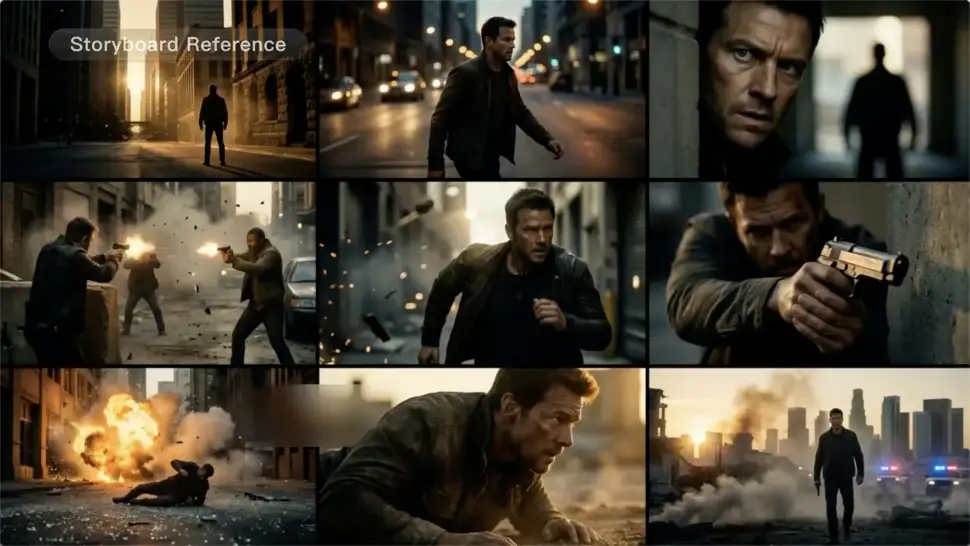
A conversation does not have to stay on one camera angle. An action beat does not have to play out in a single wide shot. Turn on Multi-Shot and Kling can plan scene transitions, framing, and camera-angle changes around what you wrote. A simple story beat can move from an establishing shot to a character close-up, then cut again when the action calls for it.
Take Over the Storyboard When the Shot Matters

Take Over the Storyboard When the Shot Matters

When you already know how the scene should be covered, use Custom Multi-Shot instead of leaving every decision to the model. Decide what happens in each shot, how long it lasts, whether the camera is wide or close, which angle you want, and how the camera moves. It gives you a practical way to turn screenplay direction or a rough shot list into something Kling can generate.

Bring the Same Character into the Next Shot

Bring the Same Character into the Next Shot

A cut should not feel like a new actor walked into the scene. Use a Character Element when someone needs to return across different angles, actions, or settings, and make it clear in the prompt which character belongs in each shot. For workflows that need a richer mix of character, image, video, and scene references, VIDEO 3.0 Omni gives you more ways to anchor the people and visual details your story depends on.

Apps

Image to Video
Image to Video

Image to Video

Text to Video
Text to Video

Text to Video

Omni
Omni

Omni

Digital Human
Digital Human

Digital Human

Restyle
Restyle

Restyle

Text to Image
Text to Image

Text to Image

60M+
60M+
Users
600M+
600M+
AI Videos Generated
4.7 ★
4.7 ★
App Store
Industry-Leading
Industry-Leading
Cinematic 4K

Reviews

James Phillips

James Phillips

★★★★★

Kling AI has transformed my workflow by collapsing timelines and democratizing production. It’s shifted my mindset from resource-dependent filmmaking to a boundless creative sandbox, where experimentation yields unexpected beauty.

Maria Rubtsova

Maria Rubtsova

★★★★★

I’m Maria Rubtsova, an AIGC digital artist passionate about creating stunning visuals in the worlds of fashion, aesthetics, and fantasy. I use KlingAi to bring imagination to life through video. My work is all about exploring beauty, emotion, and the limitless possibilities of digital art.

KakuDrop

KakuDrop

★★★★★

I have successfully collaborated with world-renowned artists and well-known companies that are recognized globally

FAQ

Q1Can I refine the color after the first AI edit?
Q2Can I recolor clothes, products, cars, or furniture with AI?
Q3Does changing image color reduce resolution?

Get More From Your Video in 4K

Keep the footage you already have and give it a higher-resolution finish. Upscale short videos to 4K, bring out more visible detail, and use prompts or references when you want more control over the final result.