Creative Studio
API
Resources
Features
About Us
Download

nano banana pro freee - ASMR cutting & miniature worlds

Immerse in unique visual themes like ASMR banana cutting, hyperrealistic banana artistry, and cinematic banana adventures. Start exploring nano banana pro freee ideas and generate your own content with AI.

nano banana pro freee - ASMR cutting & miniature worlds

Recommended

Kling AI work 300030377613435 - nano banana pro freee AI video
Louma avatar
Louma
Kling AI work 309489395505822 - nano banana pro freee AI image
EFhvNhCv avatar
EFhvNhCv
Kling AI work 312157456500528 - nano banana pro freee AI video
JMsDLstd avatar
JMsDLstd
Traitor banana🍌 - nano banana pro freee AI video
WglBXFcN avatar
WglBXFcN
Kling AI work 300895449652583 - nano banana pro freee AI image
aBAllIJI avatar
aBAllIJI
Kling AI work 311506071611971 - nano banana pro freee AI image
tEOvgyua avatar
tEOvgyua
Kling AI work 308239816664858 - nano banana pro freee AI image
LdWetsCo avatar
LdWetsCo
Banana in briefcase - nano banana pro freee AI video
WglBXFcN avatar
WglBXFcN
CYBER EGYPT - nano banana pro freee AI video
ARCXYBce avatar
ARCXYBce
Happy Moose - nano banana pro freee AI video
Bumblebee avatar
Bumblebee
banana ai humanoid  - nano banana pro freee AI image
OOqdZhbo avatar
OOqdZhbo
Kling AI work 315216982611207 - nano banana pro freee AI video
dzlhhJKq avatar
dzlhhJKq
Kling AI work 299186876612741 - nano banana pro freee AI image
AoWvVtCT avatar
AoWvVtCT
Kling AI work 308240108663007 - nano banana pro freee AI image
LdWetsCo avatar
LdWetsCo
Grumpy banana - nano banana pro freee AI video
gAcGTmMH avatar
gAcGTmMH
Kling AI work 312708409615176 - nano banana pro freee AI image
CzhfLQme avatar
CzhfLQme
Kling AI work 296121251508720 - nano banana pro freee AI image
Robbin avatar
Robbin
Crypto Pro life - nano banana pro freee AI video
KnWjmRXU avatar
KnWjmRXU
Kling AI work 307476904508692 - nano banana pro freee AI video
kbGSqAVn avatar
kbGSqAVn

How to Change the Color of an Image with AI

Upload Your Image

Upload Your Image

Start with the photo you want to recolor, whether it is a product shot, portrait, fashion image, room interior, or another creative visual.

Describe the Color Details

Describe the Color Details

Describe the object or area you want to recolor and the new color you want to see. Give a direct instruction like: “Change the jacket to dark green.”. You can also add more detail about the shade, tone, or visual direction when you have something specific in mind.

Generate and Review

Generate and Review

Generate your new image and see how the color works with the original scene. Want a warmer shade, a deeper tone, or a different area changed? Update your prompt and try another version.

More Than a Cleaner Background

Keep the Focus on Your Subject

Keep the Focus on Your Subject

Busy room? Distracting backdrop? Clear away what pulls attention from the person, product, character, or action you actually want people to see. Give product videos, presenter clips, ads, and social content a cleaner look without manually tracing the subject through every frame. No green screen. No tedious masking. Just tell Kling what needs to stay.
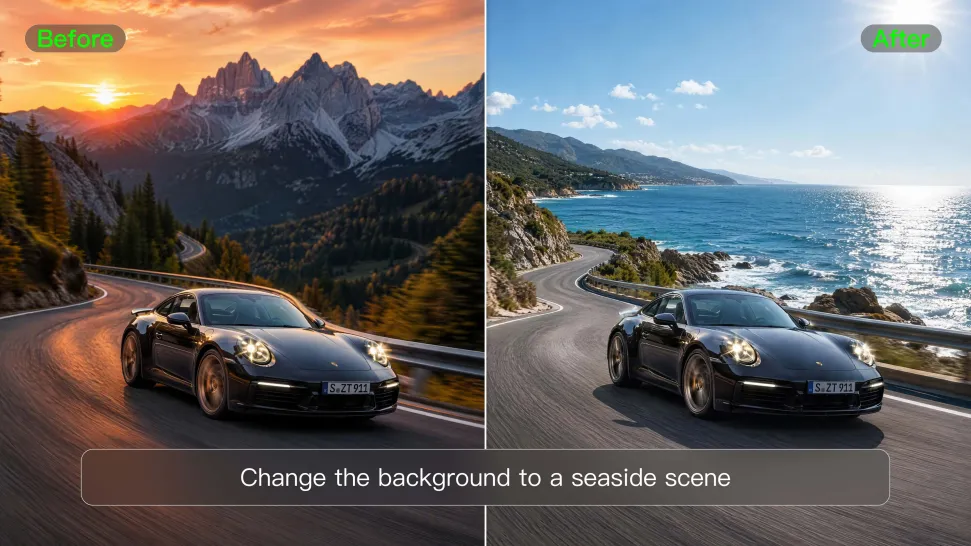
Give the Scene a Better Place to Happen

Give the Scene a Better Place to Happen

Love the footage but not where it was filmed? Change the setting instead of starting over. Describe what you want, or bring in a reference image when you already have the look in mind. Move the same shot into a clean studio, a branded space, a storefront, an outdoor scene, or somewhere completely different.
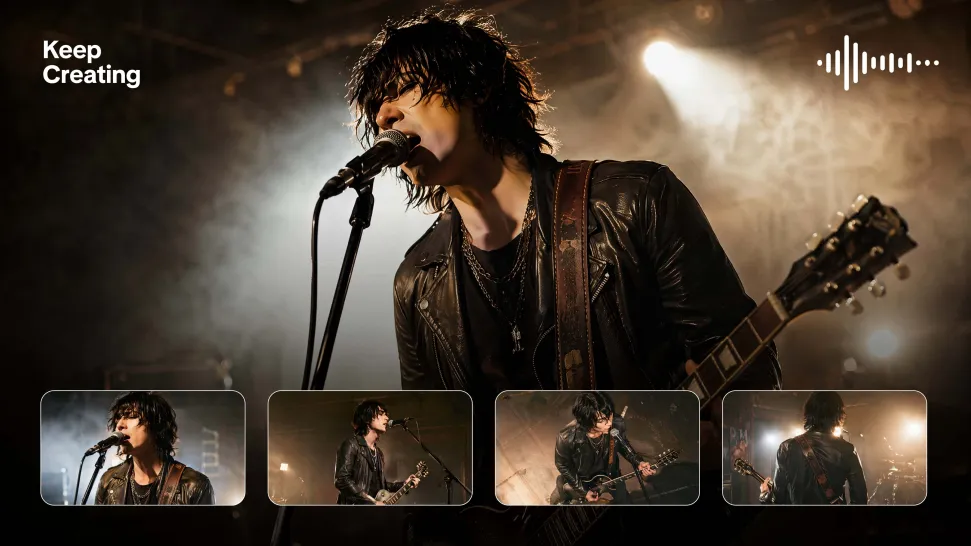
Keep Creating Without Switching Gears

Keep Creating Without Switching Gears

Once the background feels right, there is plenty more you can do in Kling AI. Generate new shots, build multi-shot sequences, work with native audio, explore Motion Control, sound, and effects, or keep shaping the video with Kling’s creative tools. From background fix to fuller video idea, you can keep the project moving with the same creative studio.

Apps

Image to Video
Image to Video

Image to Video

Text to Video
Text to Video

Text to Video

Omni
Omni

Omni

Digital Human
Digital Human

Digital Human

Restyle
Restyle

Restyle

Text to Image
Text to Image

Text to Image

60M+
60M+
Users
600M+
600M+
AI Videos Generated
4.7 ★
4.7 ★
App Store
Industry-Leading
Industry-Leading
Cinematic 4K

Reviews

Samuele Poggi (@visualsk2)

Samuele Poggi (@visualsk2)

★★★★★

I use Kling AI daily to push the limits of AI filmmaking. It allows me to create highly cinematic content, blending AI and VFX to develop innovative projects. It has significantly impacted my creative process, enabling me to achieve complex animations that would otherwise require high production budgets.

Déborah

Déborah

★★★★★

I use Kling AI every day. It's amazing to see the almost daily progress it makes. I used AI for fun at first, and I now find that Kling AI's animations allow me to gain professional visibility, with three times more views on my animated posts than on my static posts.

PJ Ace

PJ Ace

★★★★★

Kling AI has made it easy for us to generate world class visuals for Fortune 500 companies, TV shows and music for big artists. We love the easy of use of the platform and the quality of the generations. My first time using Kling AI, I got 22 million views on just one video. It's that good.

FAQ

Q1What languages does Kling AI Text to Speech support?
Q2How much does Kling AI Text to Speech cost?
Q3Are AI-generated voices realistic or robotic?

Bring Out the Best in Every Image

Transform ordinary images into refined visuals with Kling AI. Enhance details, improve the overall look, and create images that better match your creative direction.

AI image quality enhancement | Prompt-guided refinement | 2K/4K output