Creative Studio
API
Resources
Features
About Us
Download

quote for friday - Aloha vibes & kinetic energy

Embrace the kinetic energy of Friday with mesmerizing motion blur streaks and vibrant beach vibes. Unleash your creativity with unique typography and financial positivity tips. Start exploring quote for friday ideas and generate your own content with AI.

quote for friday - Aloha vibes & kinetic energy

Recommended

friday typography - quote for friday AI video
champignon19 avatar
champignon19
Kling AI work 319909927527918 - quote for friday AI video
ATCzObOx avatar
ATCzObOx
Kling AI work 307030347537953 - quote for friday AI image
gaecmCft avatar
gaecmCft
2DrunkUncs Podcast  - quote for friday AI video
LMC 5 Star Design  avatar
LMC 5 Star Design
Kling AI work 307217474614534 - quote for friday AI video
lQYNiGLU avatar
lQYNiGLU
Kling AI work 319300038614164 - quote for friday AI video
Lisa Renee avatar
Lisa Renee
Kling AI work 319300425501770 - quote for friday AI video
Lisa Renee avatar
Lisa Renee
Kling AI work 317436120504948 - quote for friday AI video
C Temptation avatar
C Temptation
Kling AI work 316276093612961 - quote for friday AI video
Blue Collar Bastard avatar
Blue Collar Bastard
Kling AI work 306535140613768 - quote for friday AI image
nemesis a.i live avatar
nemesis a.i live
Kling AI work 319441826508445 - quote for friday AI video
Richard avatar
Richard
Kling AI work 307211611532162 - quote for friday AI video
UTnZrmlJ avatar
UTnZrmlJ
Kling AI work 315933077612270 - quote for friday AI video
bcoNZKCN avatar
bcoNZKCN
Kling AI work 316004689503014 - quote for friday AI video
Blue Collar Bastard avatar
Blue Collar Bastard
Kling AI work 296781985612002 - quote for friday AI image
Liz Schmehl avatar
Liz Schmehl
Its Friday - quote for friday AI video
7A7PI avatar
7A7PI
Elite Creator
friday night funkin - quote for friday AI video
02:00
LdaMAcDm avatar
LdaMAcDm
Kling AI work 296878693613133 - quote for friday AI image
Liz Schmehl avatar
Liz Schmehl
Kling AI work 309004839613647 - quote for friday AI image
nemesis a.i live avatar
nemesis a.i live

How to Create an AI Avatar Video

Create an Avatar

Create an Avatar

Pick a ready-made character from the Avatar Library, return to a saved avatar, upload an image from your device or Assets, or generate someone new with AI Image. The selected image becomes the visual starting point for the video.

Add the Voice

Add the Voice

Upload a finished recording, or enter the lines you want the character to deliver. With text to speech, select a voice and adjust its speed and emotional tone. Use punctuation to place pauses where they naturally belong, especially in longer passages.

Shape the Performance

Shape the Performance

Describe how the character should feel, react, and move while speaking. You can write the direction yourself or begin with one of the performance options Kling AI suggests for the selected character. Generate the video and review the delivery.

Go from Written Scene to Directed Sequence

See Your Scene as More Than One Shot

See Your Scene as More Than One Shot

A conversation does not have to stay on one camera angle. An action beat does not have to play out in a single wide shot. Turn on Multi-Shot and Kling can plan scene transitions, framing, and camera-angle changes around what you wrote. A simple story beat can move from an establishing shot to a character close-up, then cut again when the action calls for it.
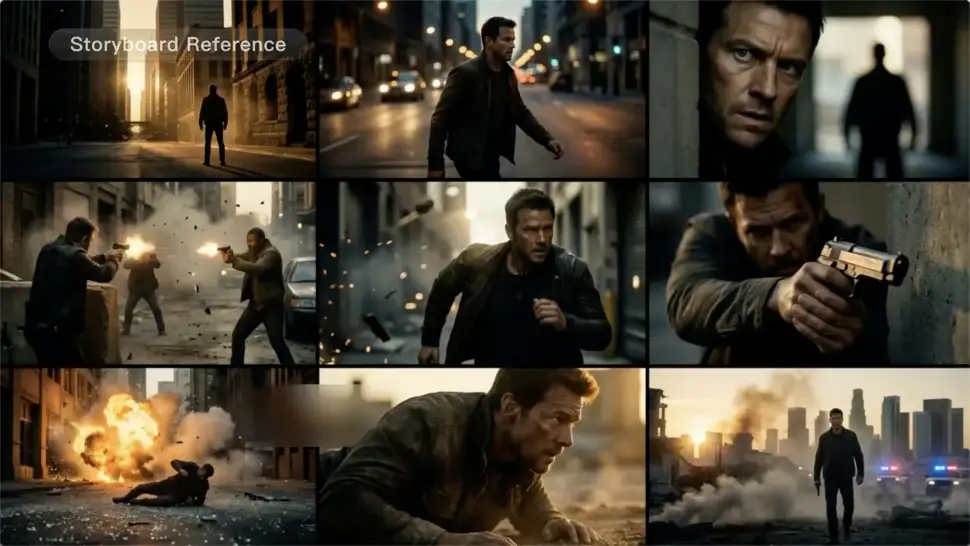
Take Over the Storyboard When the Shot Matters

Take Over the Storyboard When the Shot Matters

When you already know how the scene should be covered, use Custom Multi-Shot instead of leaving every decision to the model. Decide what happens in each shot, how long it lasts, whether the camera is wide or close, which angle you want, and how the camera moves. It gives you a practical way to turn screenplay direction or a rough shot list into something Kling can generate.

Bring the Same Character into the Next Shot

Bring the Same Character into the Next Shot

A cut should not feel like a new actor walked into the scene. Use a Character Element when someone needs to return across different angles, actions, or settings, and make it clear in the prompt which character belongs in each shot. For workflows that need a richer mix of character, image, video, and scene references, VIDEO 3.0 Omni gives you more ways to anchor the people and visual details your story depends on.

Apps

Image to Video
Image to Video

Image to Video

Text to Video
Text to Video

Text to Video

Omni
Omni

Omni

Digital Human
Digital Human

Digital Human

Restyle
Restyle

Restyle

Text to Image
Text to Image

Text to Image

60M+
60M+
Users
600M+
600M+
AI Videos Generated
4.7 ★
4.7 ★
App Store
Industry-Leading
Industry-Leading
Cinematic 4K

Reviews

Halim Alrasihi

Halim Alrasihi

★★★★★

I use AI daily and Kling AI is a crucial part of my workflow, whether for client work or personal projects. What I love most about using Kling AI is that it provides all the tools I need in one place, from keyframes to character references, elements and special effects.

Ozan Sihay

Ozan Sihay

★★★★★

Kling AI allows me to rapidly prototype ideas, refine storytelling elements, and produce visually compelling content efficiently. It has not only accelerated my creative processes, but also deepened my understanding of how AI can enrich visual storytelling.

KakuDrop

KakuDrop

★★★★★

I have successfully collaborated with world-renowned artists and well-known companies that are recognized globally

FAQ

Q1What can I use an AI voice generator for?
Q2Can Kling AI generate a standalone voice file without a video?
Q3How does an AI voice generator work?

Bring Every Voice Into the Story

Create character dialogue, multilingual voices, consistent voice identities, ambience, and sound effects with Kling VIDEO 3.0.

Multilingual Dialogue | Multi-Character Voices | Native Audio