AI concert & music visuals
Fill the room, from a prompt. The crowd, the lights, the energy of a live show — here's a real one, and how to prompt concert B-roll for your music video or promo.
On this page
Lead with the crowd and the energy (raised hands, silhouettes, a packed sea of people), describe the light show (sweeping spots, lasers, colour washes), set a big smooth camera move, and add finishing touches like confetti or haze. Kling generates concert atmosphere and B-roll from a prompt — a generic crowd and stage, not a real artist. The clip is visuals; add your own rights-cleared track in an editor.
A crowd, a light show
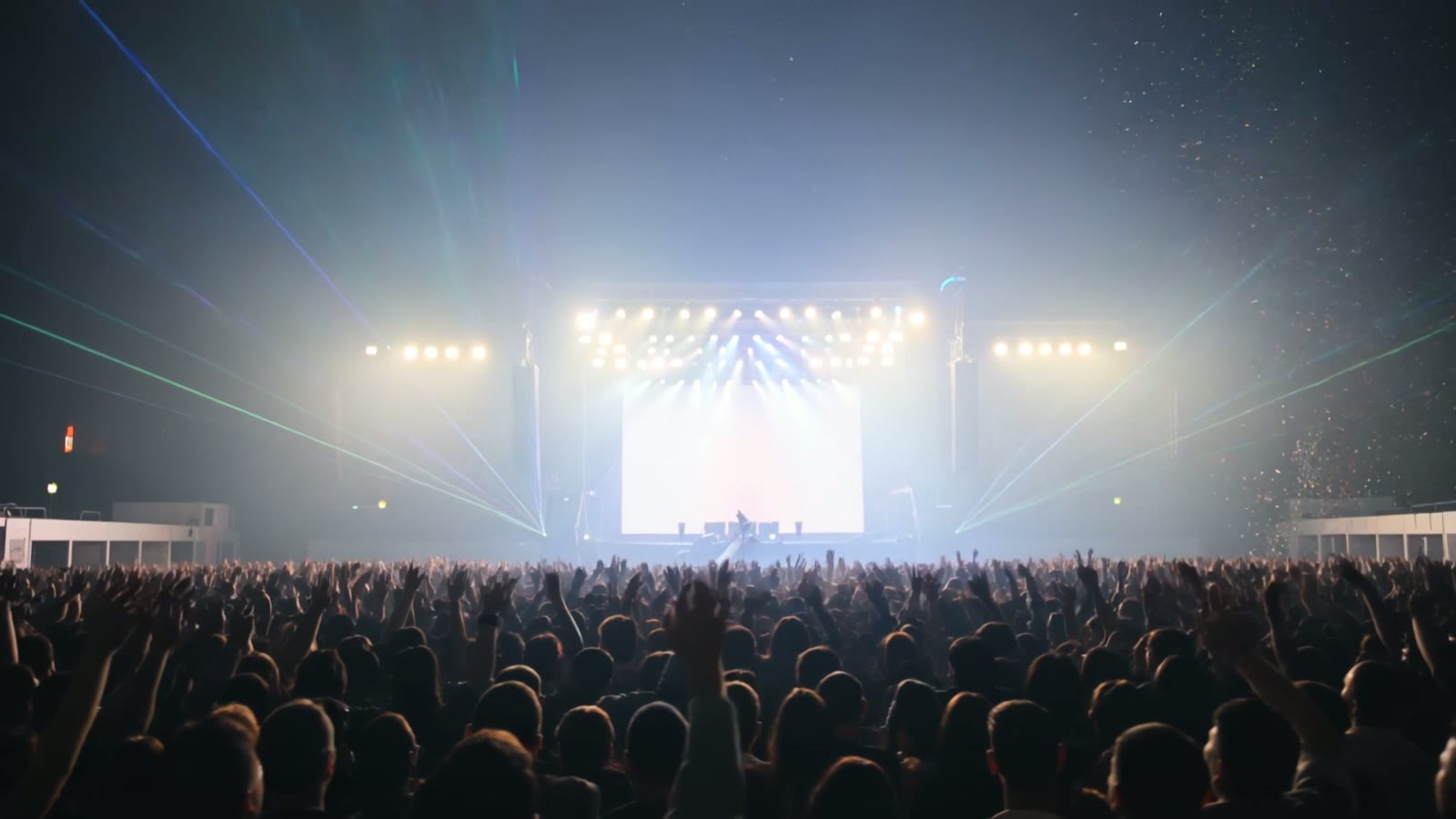
This is a real, unedited Kling text-to-video generation — no venue, no crowd to film. It reads like a live show because the prompt named the crowd, the light show and the energy a concert shot needs:
Cinematic shot of a massive concert crowd with hands raised, silhouetted against a brilliant stage light show, lasers and colourful spotlights sweeping over the audience, confetti falling, energetic atmosphere, slow sweeping camera over the crowd at night, photorealistic.
Crowd plus lights equals a gig. The raised hands and silhouettes give the scale, the sweeping lasers and spotlights give the drama, and the confetti seals the moment — an electric room, all from a sentence.
How to prompt concert energy
Lead with the crowd and the energy
Concert footage is about atmosphere. Lead with the crowd — hands raised, silhouettes, a sea of people — and the energy you want, so the shot feels alive and packed rather than empty.
Describe the light show
Stage lighting is the star of concert visuals. Name it: sweeping spotlights, lasers, colour washes, strobes, a glowing stage behind the crowd. The light is what gives the scene its scale and drama.
Set the camera move
Choose a move that matches the vibe — a slow sweep over the crowd, a push toward the stage, a rise above the audience. Big, smooth moves suit the epic feel; keep it flowing rather than jittery.
Add the finishing touches
Little extras sell the moment: confetti falling, haze in the light beams, phone screens glowing in the dark, a burst of pyro. One or two of these turn a generic crowd into a real gig.
This produces concert atmosphere and B-roll from a prompt — the crowd, the lights, the energy — ideal for music videos, promos, event teasers, lyric-video backdrops and social clips. Two honest notes: it's a generic crowd and stage, not a specific real artist or venue, and the audio is up to you — add your own rights-cleared track in an editor. Within that, it's a fast way to a big, electric concert look with no camera and no crowd to film.