AI video stories, scene by scene
Once upon a prompt. An AI video story is scenes with the same hero, told in order — here's a real generated story scene, and how to plan the arc, keep the character consistent, and build the tale.
On this page
Lead with a cartoon style (‘3D cartoon animation’, ‘storybook illustration’), design an original character (an animal or child with big friendly eyes and a signature colour), build a bright friendly world, and keep the motion gentle and playful. Kling renders the cartoon look from your words — keep characters your own rather than a known cartoon, as in the real demo here, and add narration and music in an editor for a finished little film.
One scene of a story
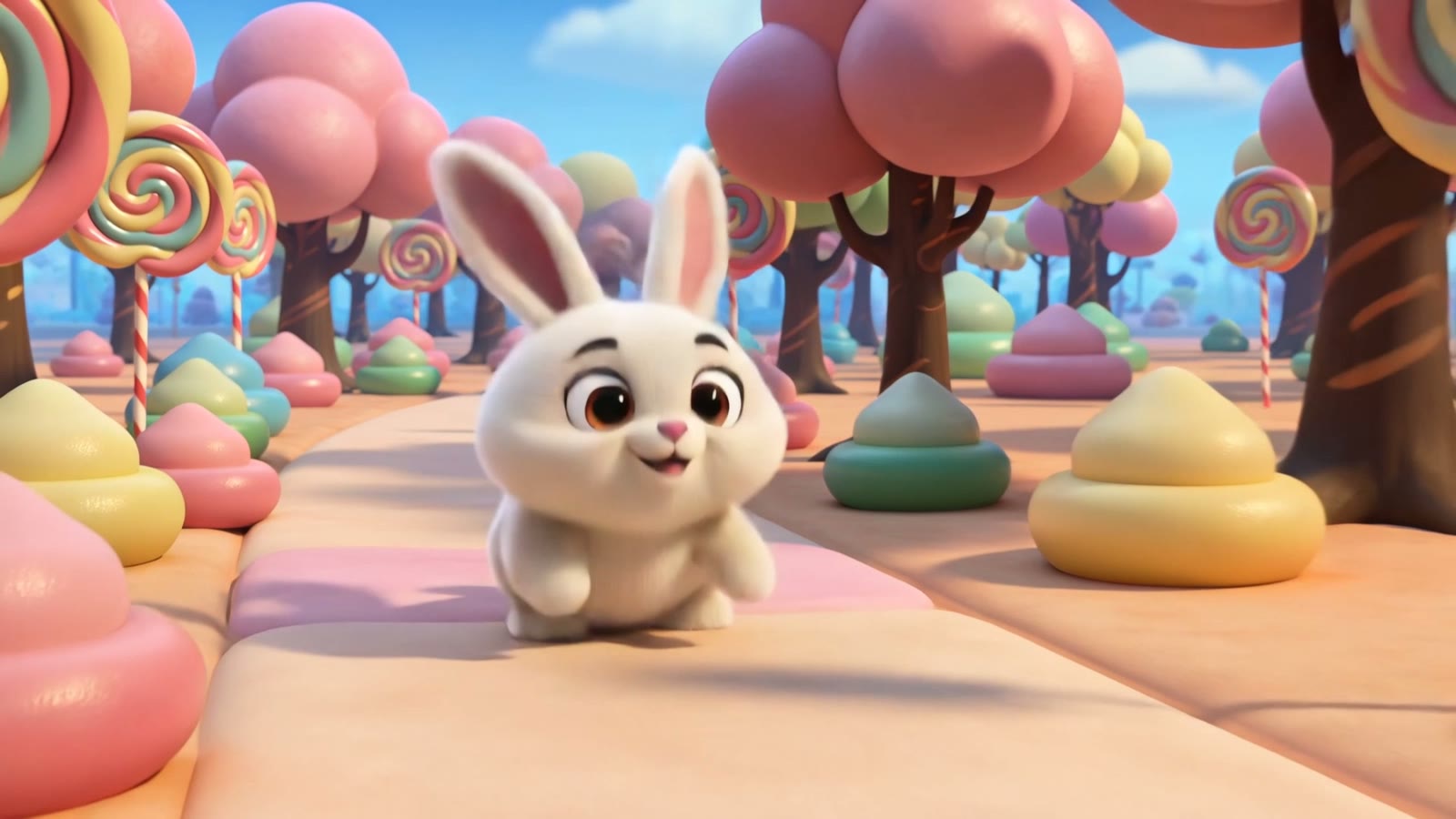
This is a real, unedited Kling generation — one scene of a story: the hero, mid-adventure, in his world. A story is several of these beats with the same character, cut together. The exact prompt is below to copy:
Cute 3D cartoon animation style, an original cheerful cartoon bunny character with big eyes hopping through a magical candy forest with lollipop trees and gumdrop bushes, bright colourful whimsical world, soft playful lighting, gentle bouncy camera, charming children's animation.
Style, character, world. The cartoon style sets the tone, the original bunny is the hero, and the candy-forest world brings the charm — three cues that turn a sentence into a storybook scene.
How to build a video story
Plan the story arc first
A video story is scenes in order: a beginning that meets the hero, a middle where something happens, an end that lands. Write the arc as three or four one-line beats before you prompt anything — each beat becomes one generation.
Design an original hero and keep it consistent
Give your story a simple, original hero: an animal or a person with a signature colour or outfit, described the same way in every scene's prompt. Consistency of description (plus an image reference) is what makes separate generations read as one story.
Pick a style and a world, and hold them
Name the look once — ‘3D cartoon animation’, ‘storybook illustration’, ‘photorealistic’ — and the setting, and repeat both in every scene. A story falls apart visually when the style or world drifts between scenes.
Generate scene by scene, then cut together
One generation per beat, one clear action per scene — a hop into frame, a discovery, a goodbye wave. Then order the clips in an editor, add narration and music, and the beats become a finished story.
Kling renders the cartoon look from your words — there's no kids' mode, which means you set the exact style, character and world. One rule keeps it yours and safe: design an original character rather than naming a known cartoon or a studio's hero, and describe it the same way each time to keep it consistent. Within that, it's a lovely, fast way to bring a bedtime story, a lesson or a character idea to life — pair the clips with narration and music in an editor for a finished little film.