AI travel videos without leaving home
The view, generated. AI can produce dreamy, cinematic destination footage from a prompt — here's a real aerial, and how to prompt the shots a travel edit is built on.
On this page
Lead with the destination and its mood (place, light, palette, time of day), then name the camera move — a slow aerial drone fly-over, a walk-through, a gentle reveal. Set the time of day and weather so the light sells it, and keep the motion smooth and cinematic. Generate several shots and edit them into a sequence. It's prompt-driven scenery for mood and B-roll — keep it honest as AI-generated, not documentation of a real trip.
A destination, from a prompt
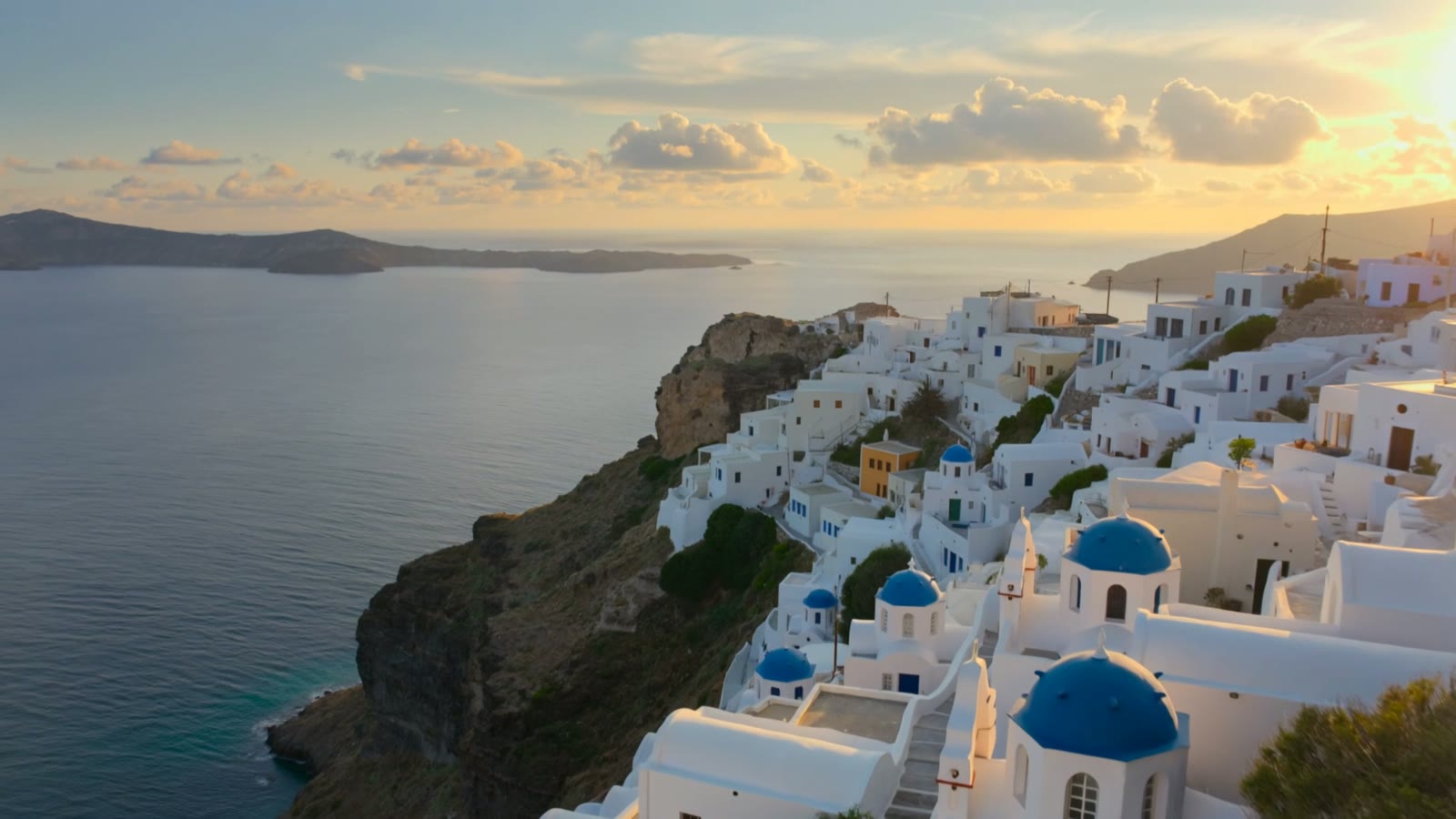
This is a real, unedited Kling text-to-video generation — no drone, no plane ticket. It reads like travel B-roll because the prompt named the place, the light and the camera move a travel shot needs:
Aerial drone shot slowly flying over a stunning Greek island village at golden sunset, whitewashed houses with blue domes cascading down the cliff, deep blue sea below, warm light, gentle clouds, cinematic travel footage, smooth flowing camera, ultra-detailed, photorealistic.
Place, light, camera. The destination is described, the golden hour is named, and the drone move is spelled out. That combination is what turns a prompt into a shot that feels like travel footage.
How to make travel footage
Describe the destination and its mood
Lead with the place and feeling: “a cliffside island village at golden sunset, whitewashed houses and blue domes, deep blue sea.” Mood — light, palette, time of day — does as much travel-selling as the location itself.
Name the camera move
Travel footage is defined by its shots. Ask for the one you want — a slow aerial drone fly-over, a walk down a lane, a gentle reveal over a ridge. The camera language is what makes it read as a travel clip and not a static postcard.
Set time of day and weather
Golden hour, blue hour, misty morning, clear midday — the light sells the destination. Name it, along with weather (soft clouds, sea haze), so the scene has the atmosphere real travel footage trades on.
Cut several shots into a sequence
One clip is a B-roll shot; a travel piece is several. Generate a few — an aerial, a detail, a walk-through — and edit them together with music. Keep it honest, too: label AI-generated scenery as such rather than passing it off as a real trip.
This generates destination scenery from a prompt: describe the place, the light and the camera move, and Kling produces cinematic B-roll for a mood piece, an intro, or an establishing shot. Two honest caveats: it's a style of place, not a verified real landmark, and it isn't a record of a trip you actually took — so use it for mood and label AI-generated scenery as such. Within that, it's a fast way to a beautiful, cinematic travel look from your desk.