First-person POV AI videos
Put the viewer inside the shot. A convincing point-of-view video comes from the right camera-language, not a special button — here's a real POV clip and the exact prompt cues behind it.
On this page
A first-person POV shot comes from camera-language in the prompt, not a preset. Open with “first-person POV”, put the viewer's own hands in frame, and ask for natural handheld bob as they move. Keep it to one short continuous move — a walk forward or a look around. Those cues are what make a shot read as seen through the viewer's eyes rather than a floating camera.
Through your own eyes
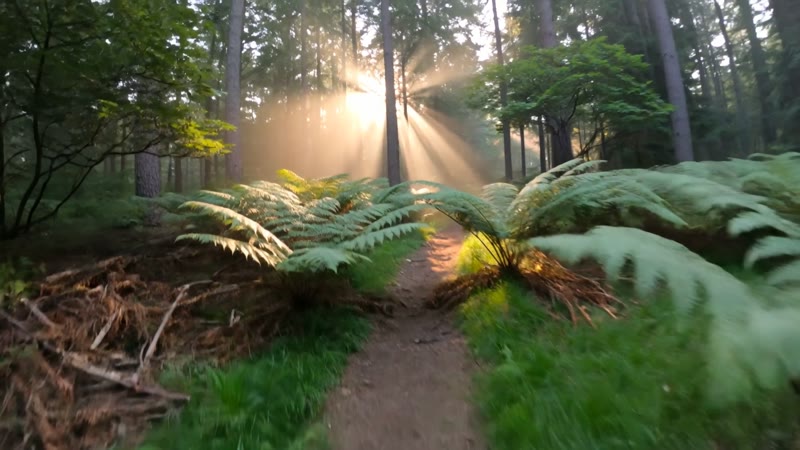
This is a real, unedited Kling generation. The giveaway that it's first-person and not a drone: the walker's own hand reaches into the bottom of the frame, and the camera bobs with each step down the trail. Four seconds, one continuous POV move:
First-person POV walking along a narrow forest trail at golden hour, the walker's hands reach into frame to push aside green ferns and low branches, the camera bobs and sways naturally with each footstep, warm sunlight streaming through tall trees, dust and pollen floating in the light beams, immersive point-of-view shot, realistic handheld motion.
Hands and a bob — that's the whole illusion. The hand entering frame and the natural camera sway are what say “you're walking this,” not “you're watching this.” Drop either and it turns into a floating drone shot.
How to prompt a POV shot
Say “first-person POV” up front
POV lives or dies on the camera instruction. Open the prompt with “first-person POV” or “point-of-view shot” so the model frames the scene from the viewer's own eyes rather than watching a subject from outside.
Put the viewer's hands in frame
The tell of a real POV is your own hands. Prompt them explicitly — “the walker's hands reach into frame to push aside ferns” — and the shot instantly reads as first-person instead of a floating camera.
Prompt natural handheld motion
POV feels human when the camera moves like a body does. Ask for a gentle bob and sway with each step, a slow forward walk — not a smooth glide, which reads as a drone. The imperfection is the realism.
Keep it to one continuous move
POV holds best as a single, short, unbroken shot — a few seconds of walking forward or looking around. Cuts and big direction changes break the illusion; for a longer sequence, generate several POV clips and join them in an editor.
There's no “POV mode” to switch on — the viewpoint is something you write. The three cues that carry it are a first-person framing, the viewer's own hands or body in shot, and a slightly imperfect handheld motion. Get those in the prompt and Kling composes the scene from the eyes out. Leave them vague and you'll get a nice shot that's watching the scene from outside, which is the opposite of POV.