Make your pet talk with AI
One photo, and your pet is chatting. AI can make a pet's mouth move like it's talking — here's a real one, and how the voice gets added after.
On this page
Start from a clear, front-on photo of your pet (your own works), load it into image-to-video, and prompt the mouth to open and close as if talking. This animates the mouth motion — it doesn't lip-sync to a voice, since lip-sync is built for human faces — so you add the actual voice as a separate audio track in a video editor, timed to the movement. That combination is how a convincing talking-pet clip is made.
A puppy, mid-sentence
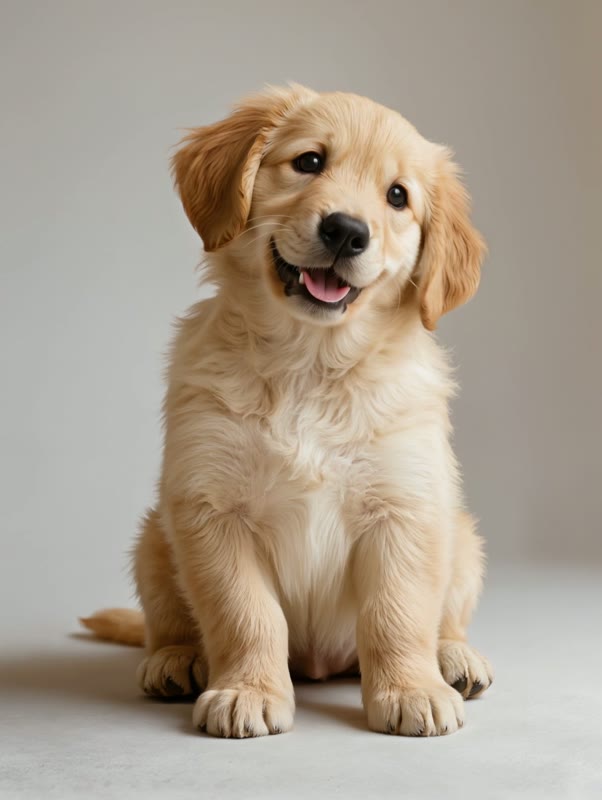
The puppy photo at the top was generated in Kling for this demo, then loaded into image-to-video with a prompt to move its mouth like talking. Four real, unedited seconds later it's opening and closing its mouth, ears perking — a pet that looks like it's mid-sentence:
The golden retriever puppy looks directly at the camera and moves its mouth open and closing naturally as if talking to the viewer, ears perking up, head tilting slightly, bright expressive eyes, friendly and animated, the background stays completely still.
The mouth moves; the voice comes later. This clip is the motion — the illusion that the pet is speaking. Drop it into an editor, add a voiceover or caption timed to the mouth, and your pet is officially talking.
How to make your pet talk
Start with a clear, front-on pet photo
A single pet facing the camera, mouth visible, well lit against a simple background — a real photo of your own dog or cat works. The clearer the face and mouth, the more convincing the talking motion.
Load it into image-to-video
Add the photo as the start frame in Kling's Video Generation so it animates your actual pet rather than inventing a new one.
Prompt the mouth to move like talking
Describe it plainly: “the pet looks at the camera and moves its mouth open and closing as if talking, ears perking, head tilting slightly.” That mouth motion is what sells the illusion of speech.
Add the voice in a video editor
The clip gives you a pet that looks like it's talking; the actual voice — a funny voiceover, a caption, a song — goes on afterwards as an audio track in any editor, timed to the mouth. That layer is what makes it read as your pet ‘saying’ something.
This isn't lip-sync — that tool is built for human faces and doesn't map cleanly onto a muzzle. What works for pets is image-to-video: prompt the mouth to move like talking, and you get a pet that clearly looks like it's speaking. The actual voice — the funny line, the song, the caption — is added afterwards as an audio track in any editor, timed to the mouth. Two simple steps, and a far more believable talking pet than forcing a human lip-sync tool onto your dog.